0%

使用LCD屏幕

1. LCD操作原理

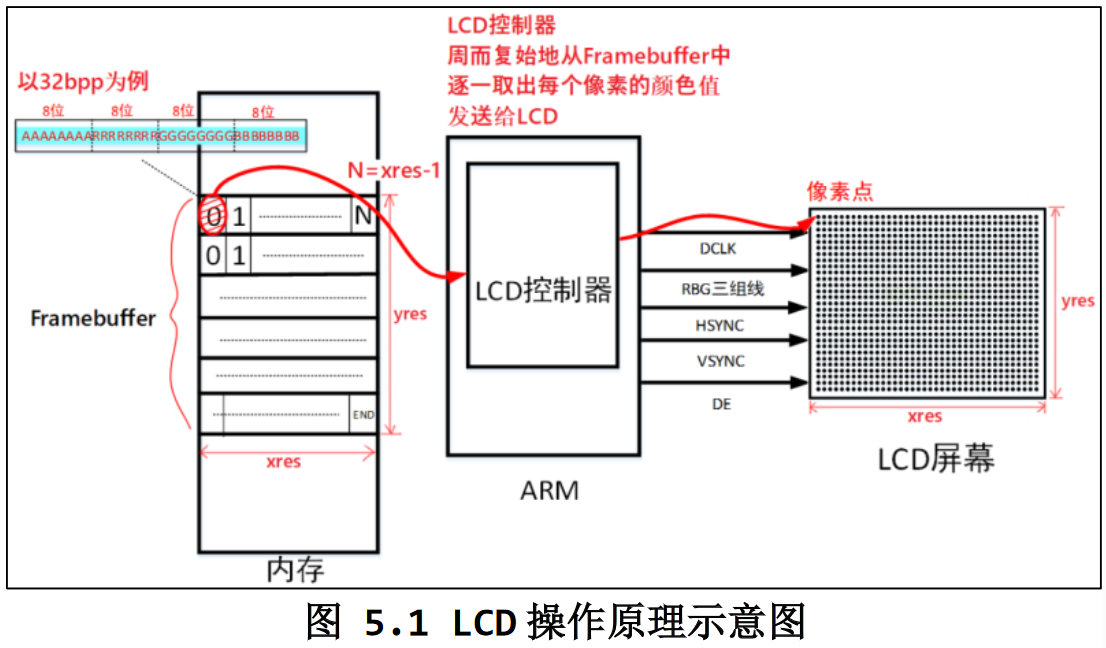
  1. 驱动程序:Farmebuffer驱动程序设置好LCD控制器:
    1. 根据 LCD 的参数设置 LCD 控制器的时序、信号极性;
    2. 根据 LCD 分辨率、BPP(Bit Per Pixel)分配 Framebuffer。
  2. 应用程序:使用 ioctl 获得 LCD 分辨率、BPP;通过 mmap 映射 Framebuffer,在 Framebuffer 中写入数据
  3. LCD控制器周而复始的从内存中取出LCD屏幕上每一个像素点的显示数据

image-20230912204455923

计算(x,y)坐标处像素对应Framebuffer地址:

1
(x,y)像素起始地址 = fb_base + (xres * bpp / 8) * y + x * bpp / 8

1.1 像素RGB显示格式

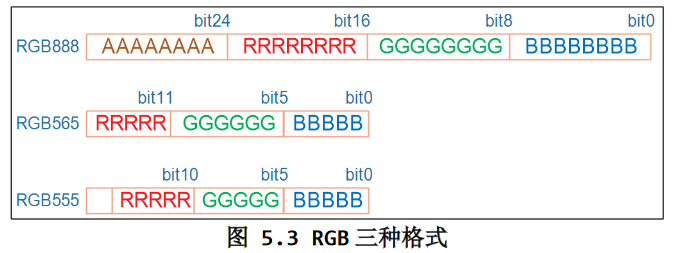
  • 32BPP:一般只设置其中的低 24 位,高 8 位表示透明度,一般的 LCD 都不支持。
  • 24BPP“硬件上为了方便处理,在 Framebuffer 中也是用 32 位来表 示,效果跟 32BPP 是一样的。
  • 16BPP:常用的是 RGB565;很少的场合会用到 RGB555

image-20230912205546653

1.2 LCD设置

实验过程中LCD过几分钟就黑屏,可以关闭黑屏的功能,执行以下命令即可:

1
echo -e "\033[9;0]" > /dev/tty0

移除LCD自带的GUI,执行以下命令之后重启:

1
2
mv  /etc/init.d/S99myirhmi2  /root 
mv /etc/init.d/S05lvgl /root

2.编写LCD应用程序

在LCD屏幕上显示点

1
2
3
4
5
6
7
8
9
10
11
12
13
14
15
16
17
18
19
20
21
22
23
24
25
26
27
28
29
30
31
32
33
34
35
36
37
38
39
40
41
42
43
44
45
46
47
48
49
50
51
52
53
54
55
56
57
58
59
60
61
62
63
64
65
66
67
68
69
70
71
72
73
74
75
76
77
78
79
80
81
82
83
84
85
86
87
88
89
90
91
92
93
94
95
96
97
98
99
100
#include <sys/mman.h>
#include <sys/types.h>
#include <sys/stat.h>
#include <unistd.h>
#include <linux/fb.h>
#include <fcntl.h>
#include <stdio.h>
#include <string.h>
#include <sys/ioctl.h>

static int fd_fb;
static struct fb_var_screeninfo var; /* Current var */
static int screen_size;
static unsigned char *fb_base;
static unsigned int line_width;
static unsigned int pixel_width;

void lcd_put_pixel(int x, int y, unsigned int color)
{
unsigned char *pen_8 = fb_base+y*line_width+x*pixel_width;
unsigned short *pen_16;
unsigned int *pen_32;

unsigned int red, green, blue;

pen_16 = (unsigned short *)pen_8;
pen_32 = (unsigned int *)pen_8;

switch (var.bits_per_pixel)
{
case 8:
{
*pen_8 = color;
break;
}
case 16:
{
/* 565 */
red = (color >> 16) & 0xff;
green = (color >> 8) & 0xff;
blue = (color >> 0) & 0xff;
color = ((red >> 3) << 11) | ((green >> 2) << 5) | (blue >> 3);
*pen_16 = color;
break;
}
case 32:
{
*pen_32 = color;
break;
}
default:
{
printf("can't surport %dbpp\n", var.bits_per_pixel);
break;
}
}
}

int main(int argc, char **argv)
{
int i;

fd_fb = open("/dev/fb0", O_RDWR);
if (fd_fb < 0)
{
printf("can't open /dev/fb0\n");
return -1;
}
// 用来操作底层设备文件参数的系统调用
// 打开的文件描述符 设备相关请求代码 存放信息的内存指针
if (ioctl(fd_fb, FBIOGET_VSCREENINFO, &var))
{
printf("can't get var\n");
return -1;
}

line_width = var.xres * var.bits_per_pixel / 8;
pixel_width = var.bits_per_pixel / 8;
screen_size = var.xres * var.yres * var.bits_per_pixel / 8;
// 从fd_fb文件中0位置映射screen_size到内存中(由内核自动选择起始地址),该内容可读可写并且修改会反映到源文件中
fb_base = (unsigned char *)mmap(NULL, screen_size, PROT_READ | PROT_WRITE, MAP_SHARED, fd_fb, 0);
if (fb_base == (unsigned char *)-1)
{
printf("can't mmap\n");
return -1;
}

/* 清屏: 全部设为白色 */
memset(fb_base, 0xff, screen_size);

/* 随便设置出100个为红色 */
for (i = 0; i < 100; i++)
lcd_put_pixel(var.xres/2+i, var.yres/2, 0xFF0000);

//取消从fb_base起始,screen_size的字节区域内的任何映射
munmap(fb_base , screen_size);
close(fd_fb);

return 0;
}

3.文字显示

3.1 常用编码方式介绍

3.1.1 ANSI

  • ANSI 是 ASCII 的扩展,对于 ASCII 字符仍以一个字节来表示,对于非 ASCII 字符则使用 2 字节来表示
  • ANSI 编码,它跟 “本地化”(locale)密切相关。比如在大陆地区,ANSI 的默认编码是 GB2312; 在港澳台地区默认编码是 BIG5
  • 例如GB2312编码的A中对应十六进制为41 D6 D041的最高位是0,则是单字节的ASCII码,D6的最高位是1,则D6是一个双字节字符的高字节,然后在GB2312的编码表中在进行查找
  • 这样的方式,导致同一个字符对应不同的编码,同一文件在不同地区打开时可能会乱码

3.1.2 Unicode

  • Unicode编码对于地球上任意一个字符,都会给它一个唯一的数值

  • Unicode中的数值范围是 0x0000 至 0x10FFFF

  • Unicode 的三种实现方式:UTF-16le(小字节序)、UTF-16be(大字节序)、UTF-8(可变长编码)对于“A中”的编码如下:

    1
    2
    3
    4
    FF FE 41 00 2D 4E       //UTF-16le
    FE FF 00 41 4E 2D //UTF-16be
    EF BB BF 41 E4 B8 A0 //UTF-8
    41 D6 D0 //ANSI

    UTF-16le 的 BOM 为 FF FE,UTF-16be 的 BOM 为 FE FF,UTF-8 的 BOM 为 EF BB BF,ANSI 没有头部BOM

3.1.3 Unicode的编码实现-UTF8

  • UTF8的BOM为:ef bb bf

  • 为了对于常用字符用尽可能少的字节进行表示,同时又能表示出所有的字符,UTF8采用了一种可变字节的方式来表示所有字符的Unicode编码

  • 对于 ASCII 字符,在 UTF8 文件中直接用其 ASCII 码来表示

    • 对于一个字节,如果第一位为0,则为ASCII码,并且独立的表示一个字符
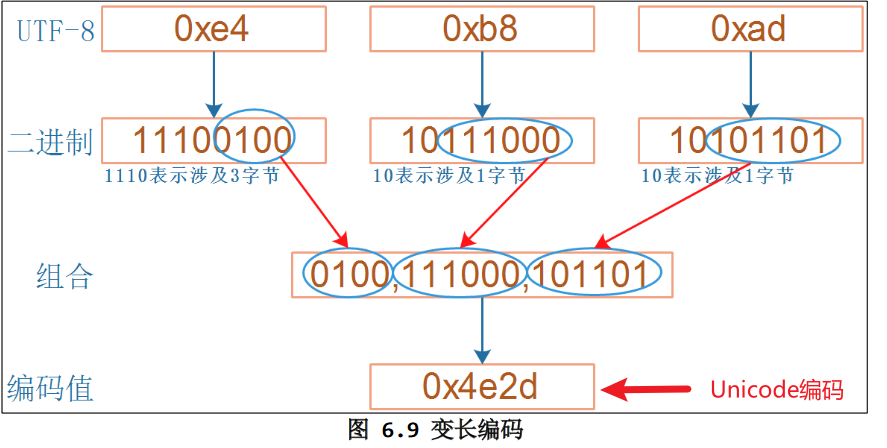
  • 对于非 ASCII 字符,使用变长的编码,一个字符的高字节的高位自带长度信息:

    • 对于两字节字符:高字节的高位为:110
    • 对于三字节字符:高字节的高位为:1110
    • 对于四字节字符:高字节的高位为:11110
    • 对于以上这些多字节的字符的其他字节,高位为:10

    image-20230912220629188

  • UTF-8节省空间,扩展性好,丢失部分数据不会影响其他数据的正常显示

  • 求一个 UTF-8 字符的 Unicode 编码:

    1
    2
    3
    4
    5
    6
    7
    8
    9
    10
    11
    12
    13
    14
    15
    16
    17
    18
    19
    20
    21
    22
    23
    24
    25
    26
    27
    28
    29
    30
    31
    32
    33
    34
    35
    36
    37
    static int Utf8GetCodeFrmBuf(unsigned char *pucBufStart, unsigned char *pucBufEnd, unsigned int *pdwCode)
    {
    int i;
    int iNum;
    unsigned char ucVal;
    unsigned int dwSum = 0;

    if (pucBufStart >= pucBufEnd)
    return 0;

    ucVal = pucBufStart[0];
    // 求该字节中前导1的个数
    iNum = GetPreOneBits(pucBufStart[0]);

    if ((pucBufStart + iNum) > pucBufEnd)
    return 0;

    if (iNum == 0)
    {
    *pdwCode = pucBufStart[0];
    return 1;
    }
    else
    {
    ucVal = ucVal << iNum;
    ucVal = ucVal >> iNum;
    dwSum += ucVal;
    for (i = 1; i < iNum; i++)
    {
    ucVal = pucBufStart[i] & 0x3f;
    dwSum = dwSum << 6;
    dwSum += ucVal;
    }
    *pdwCode = dwSum;
    return iNum;
    }
    }

3.2 显示英文点阵字符

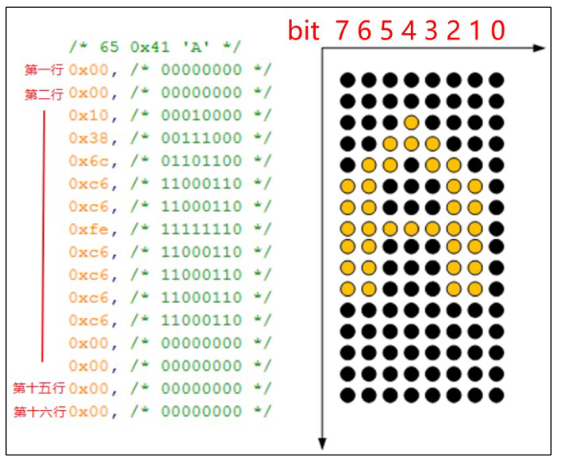
在 Linux 内核源码中有这个文件:lib\fonts\font_8x16.c

image-20230913145835456

对应的显示函数:

1
2
3
4
5
6
7
8
9
10
11
12
13
14
15
16
17
18
19
20
21
22
23
void lcd_put_ascii(int x, int y, unsigned char c)
{
unsigned char *dots = (unsigned char *)&fontdata_8x16[c*16];
int i, b;
unsigned char byte;
for (i = 0; i < 16; i++)
{
byte = dots[i];
for (b = 7; b >= 0; b--)
{
if (byte & (1<<b))
{
/* show */
lcd_put_pixel(x+7-b, y+i, 0xffffff); /* 白 */
}
else
{
/* hide */
lcd_put_pixel(x+7-b, y+i, 0); /* 黑 */
}
}
}
}

3.3 显示中文点阵字符

3.3.1 指定代码文件的编码格式

代码文件中包含非ASCLL码的字符时,尤其要注意文件的编码格式

  • 在编译程序时使用以下选项告诉编译器代码文件的编码格式;如果不指定,则编译器会默认代码文件的编码格式为UTF-8:

    1
    2
    -finput-charset=GB2312 
    -finput-charset=UTF-8
  • 在编译程序时使用以下选项指定可执行程序里的字符的编码格式;:

    1
    2
    -fexec-charset=GB2312 
    -fexec-charset=UTF-8

如果-finput-charset-fexec-charset不一样,则编译器会执行格式转换

3.3.2 汉字区位码

HZK16是常用汉字的16×16点阵字库,使用GB2312编码值来查找点阵。

以”中”字为例,它的编码值是0xd6 0xd0,其中的0xd6 表示区码,表示在哪一个区:第0xd6-0xa1 区;其中的0xd0表示位码,表示它是这个区里的哪一个字符:第0xd0-0xa1个。每一个区有 94 个汉字。区位码从0xa1 而不是从 0 开始,是为了兼容 ASCII 码。所以”中”对应HZK16中(0xd6 - 0xa1) * 94 + (0xd0 - 0xa1)位置的字符。
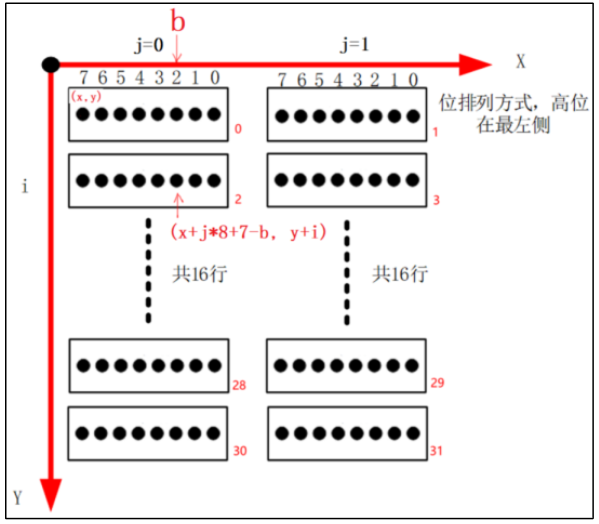
image-20230913163259874

对应显示函数:

1
2
3
4
5
6
7
8
9
10
11
12
13
14
15
16
17
18
19
20
21
22
23
24
25
26
void lcd_put_chinese(int x, int y, unsigned char *str)
{
unsigned int area = str[0] - 0xA1;
unsigned int where = str[1] - 0xA1;
unsigned char *dots = hzkmem + (area * 94 + where)*32;
unsigned short word;

int i, j, b;
for (i = 0; i < 16; i++)
{
word = dots[i * 2] << 8 | dots[i * 2 + 1];
for(j = 15; j >= 0; j--)
{
if (word & (1<<j))
{
/* show */
lcd_put_pixel(x+15-j, y+i, 0xffffff); /* 白 */
}
else
{
/* hide */
lcd_put_pixel(x+15-j, y+i, 0); /* 黑 */
}
}
}
}

4.使用FreeType

  • FreeType库是开源的高质量字体引擎;支持多种字体格式文件,并提供了统一的访问接口;

  • 可以在官网下载到FreeType库,包括文档和示例代码

4.1 矢量字体

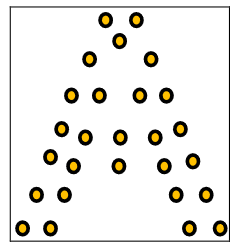
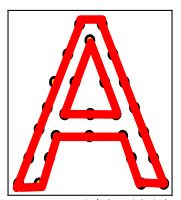
使用点阵字库显示字符时,大小固定,如果缩放的话字体显示效果会比较差,而矢量字体能够很好解决这个问题。矢量字体的形成分为三步:

  1. 确定关键点(glyph)

    image-20230916205045563

  2. 使用贝塞尔曲线连接头键点

    image-20230916205059339

  3. 填充闭合曲线内部空间

    image-20230916205116566

对于矢量字体进行缩放,关键点的相对位置不变,只要用数学曲线平滑,字体就不会变形。

4.2 使用FreeType显示矢量字体

矢量字体文件中记录不同字符的关键点(glyph);Windows使用的字体文件在C:\Windows\Fonts目录下,拓展名为.TTF都是矢量字库。

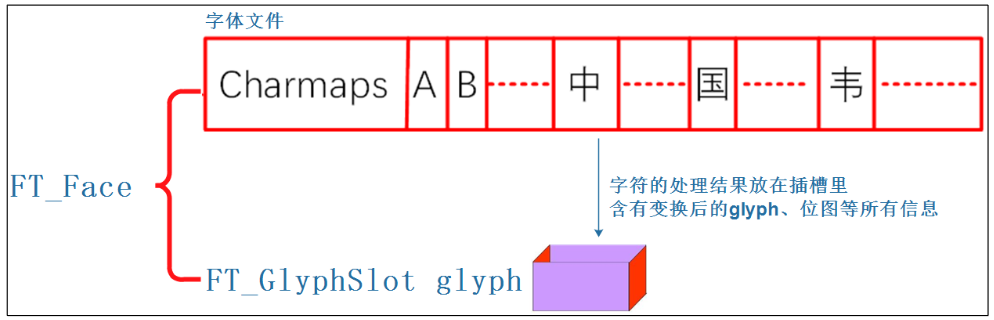
和点阵字库一样,矢量字库也是通过字符编码来寻址,从而找到对应的字体关键点。Charmaps表示矢量字库的字符映射表,可能支持多种编码进行寻址,例如ASCII、GB2312、UniCode,一般矢量字库都支持UniCode编码。

4.2.1 步骤概括

  1. 获取字符UniCode编码值
  2. 设置字体大小
  3. 根据编码从Charmaps中找到对应的关键点,FreeType库会根据字体大小自动调整关键点位置
  4. 把关键点转换为点阵位图
  5. 在LCD上进行显示

参考FreeType库官网的使用文档,可以总结使用FreeType库的调库步骤:

  1. 初始化:FT_InitFreeType
  2. 加载字体文件Face:FT_New_Face
  3. 设置字体大小:FT_Set_Char_SizesFT_Set_Pixel_Sizes
  4. 选择Charmap:FT_Select_Charmap
  5. 根据字符编码charcode得到字符位图:FT_Load_Char(face, charcode, FT_LOAD_RENDER)
    1. 根据编码值Charcode找到glyph_index:glyph_index = FT_Get_Char_Index(face, charcode)
    2. 根据glypg_index取出glyph:FT_Load_Glyph(face, glyph_index)
    3. 转换为点阵位图:FT_Render_Glyph
  6. 移动或者旋转:FT_Set_Transform
  7. 调用LCD显示函数将位图进行显示

4.2.2 FreeType的几个重要结构体

FT_Library

对于 freetype 库,使用 freetype 之前要先调用以下代码进行初始化:

1
2
FT_Library library; /* 对应 freetype 库 */ 
error = FT_Init_FreeType( &library ); /* 初始化 freetype 库 */
FT_face

对应矢量字体文件,使用如下代码来打开一个字体文件

1
error = FT_New_Face(library, font_file, 0, &face ); /* 加载字体文件 */

image-20230917170926592

FT_GlyphSlot

插槽,用来保存字符的处理结果(比如glyph,位图等信息)。当处理face字库中下一个字符时,会覆盖掉插槽中保存的上一个字符的内容。

1
FT_GlyphSlot slot = face->glyph; /* 插槽: 字体的处理结果保存在这里 */

FT_Glyph

字符的原始关键点信息,使用 freetype 的函数可以放大、 缩小、旋转,这些新的关键点保存在插槽中

1
2
FT_Glyph glyph;
error = FT_Get_Glyph(slot, &glyph);
FT_BBox

表示一个字符的外框,即新 glyph 的外框:

1
2
3
4
5
6
7
8
typedef struct  FT_BBox_
{
FT_Pos xMin, yMin;
FT_Pos xMax, yMax;
} FT_BBox;

FT_BBox glyph_bbox;
FT_Glyph_Get_CBox(glyph, FT_GLYPH_BBOX_TRUNCATE, &bbox ); /* 从glyph得到外框: bbox */

4.2.3 在LCD上显示矢量字体

使用wchar_t获取字符的UniCode值

wchar_t是宽字符类型,根据系统可能大小是2字节或者4字节。使用宽字符保存的字符编码格式为UTF-16或者UTF-32都属于Unicode编码家族。不同于UTF-8,这两种编码对于每一个字符都是用相同的字节保存,所以宽字符中保存的就是该字符对应的原始Unicode编码

1
2
3
4
5
6
7
8
9
10
11
12
13
14
15
16
#include <stdio.h>
#include <string.h>
#include <wchar.h>

int main( int argc, char** argv)
{
wchar_t *chinese_str = L"中gif"; //L指示编译器该字符串按宽字符保存
int i;
printf("sizeof(wchar_t) = %d, str's Uniocde: \n", (int)sizeof(wchar_t));
for (i = 0; i < wcslen(chinese_str); i++)
{
printf("0x%x ", chinese_str[i]);
}
printf("\n");
return 0;
}

在我的系统上输出:

1
2
sizeof(wchar_t) = 4, str's Uniocde: 
0x4e2d 0x67 0x69 0x66
代码
1
2
3
4
5
6
7
8
9
10
11
12
13
14
15
16
17
18
19
wchar_t *chinese_str = L"繁";
FT_Library library;
FT_Face face;
int error;
FT_Vector pen;
FT_GlyphSlot slot;
// 初始化FreeType库
error = FT_Init_FreeType( &library );
// 从字体文件路径argv[1] 取出索引为0的字体 放入face结构体中
error = FT_New_Face( library, argv[1], 0, &face );
slot = face->glyph;
// 设置字体大小
FT_Set_Pixel_Sizes(face, font_size, 0);
/* load glyph image into the slot (erase previous one) */
error = FT_Load_Char( face, chinese_str[0], FT_LOAD_RENDER );
//绘制点阵位图
draw_bitmap( &slot->bitmap,
var.xres/2,
var.yres/2);

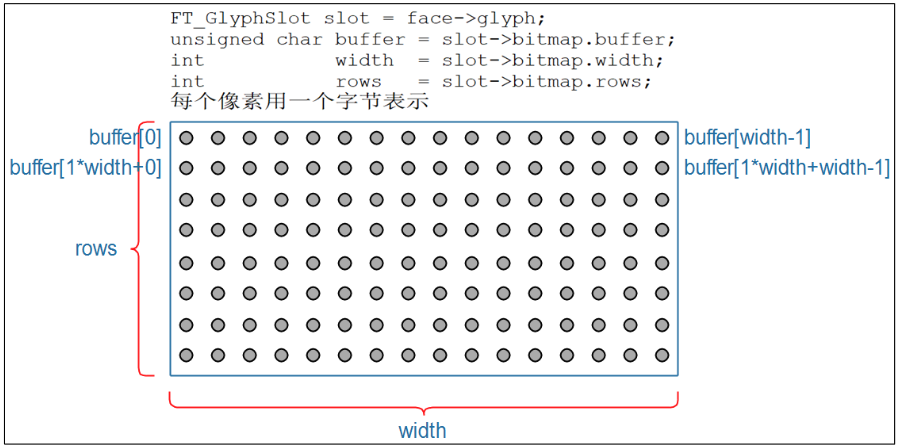
绘制位图,位图中的每一个像素使用一字节表示:

1
2
3
4
5
6
7
8
9
10
11
12
13
void draw_bitmap(FT_Bitmap *bitmap, FT_Int x, FT_Int y) {
FT_Int i, j, p, q;
FT_Int x_max = x + bitmap->width;
FT_Int y_max = y + bitmap->rows;

for (j = y, q = 0; j < y_max; j++, q++) {
for (i = x, p = 0; i < x_max; i++, p++) {
if (i < 0 || j < 0 || i >= var.xres || j >= var.yres)
continue;
lcd_put_pixel(i, j, bitmap->buffer[q * bitmap->width + p]);
}
}
}

image-20230917151354574

4.2.4 字体的平移和旋转

1
2
3
4
5
6
7
8
9
10
11
12
13
14
15
16
17
18
FT_Vector     pen;
FT_Matrix matrix;
double angle;
// 设置字体的相对平移量
pen.x = 0;
pen.y = 0;
// 角度转弧度
angle = ( 1.0* strtoul(argv[2], NULL, 0) / 360 ) * 3.14159 * 2;
/* 设置旋转矩阵
cos() -sin()
sin() cos()
*/
matrix.xx = (FT_Fixed)( cos( angle ) * 0x10000L );
matrix.xy = (FT_Fixed)(-sin( angle ) * 0x10000L );
matrix.yx = (FT_Fixed)( sin( angle ) * 0x10000L );
matrix.yy = (FT_Fixed)( cos( angle ) * 0x10000L );
// 对字体进行平移和旋转
FT_Set_Transform( face, &matrix, &pen);

4.3 使用FreeType显示一行文字

4.3.1 坐标系转换

FreeType使用的坐标系是笛卡尔坐标系,和LCD使用的坐标系之间需要进行转换:
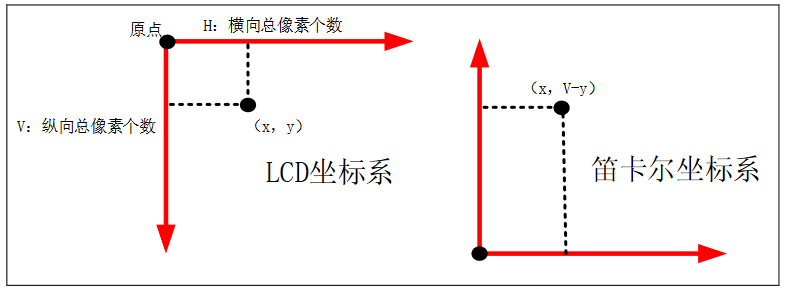
image-20230917160355054

4.3.2 使用矢量字体显示一行文字的过程

如果需要在给定坐标处作为左上角显示一行文字;使用点阵字体显示时,每个字符大小已知且相等,可以直接在指定位置上显示字符;

但是使用矢量字体:

  • 由于每一个字符的大小和位置都不同,必须遍历一行文字,求出这行文字最小外接矩形的笛卡尔坐标
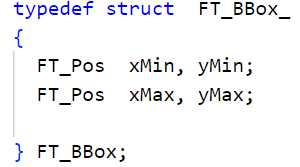
    image-20230917163256692

  • 假设给定坐标的笛卡尔坐标为,最小外接矩形的左上角坐标为,则坐标为平移之后第一个字符显示的原点(origin)

    image-20230917164024463

  • 知道第一个字符的原点,可以通过FT_Set_Transform(face, 0, &pen);设置平移向量;

  • 设置完所有矢量字体的参数之后,将第一个字符的左上角坐标转换为LCD坐标,即可显示第一个字符的位图
image-20230917164220523

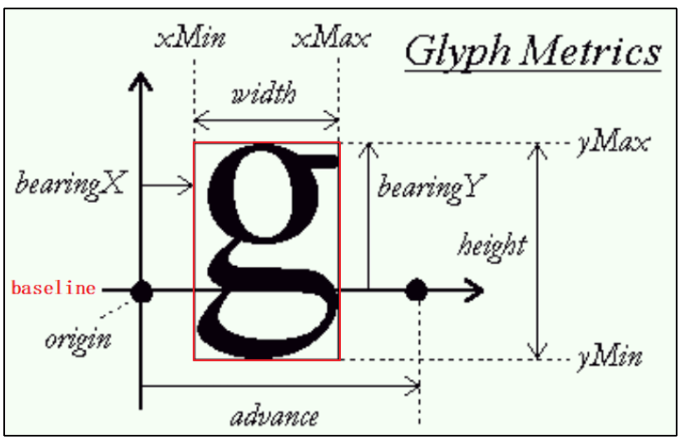
  • 然后由第一个字符的步进量advance得到下一个字符的origin,即可重复上面的过程

    image-20230917164513063

矢量字符大小示意图:

image-20230917162254764

4.3.3 代码

求最小外接矩形
1
2
3
4
5
6
7
8
9
10
11
12
13
14
15
16
17
18
19
20
21
22
23
24
25
26
27
28
29
30
31
32
33
34
35
36
37
38
39
40
41
42
43
44
45
46
47
48
49
int compute_string_bbox(FT_Face face, wchar_t *wstr, FT_BBox *abbox) {
int i;
int error;
FT_BBox bbox;
FT_BBox glyph_bbox;
FT_Vector pen;
FT_Glyph glyph;
FT_GlyphSlot slot = face->glyph;

/* 初始化 */
bbox.xMin = bbox.yMin = 32000;
bbox.xMax = bbox.yMax = -32000;
/* 指定原点为(0, 0) */
pen.x = 0;
pen.y = 0;

/* 计算每个字符的bounding box */
/* 先translate, 再load char, 就可以得到它的外框了 */
for (i = 0; i < wcslen(wstr); i++) {
/* 转换:transformation */
FT_Set_Transform(face, 0, &pen);

/* 加载位图: load glyph image into the slot (erase previous one) */
error = FT_Load_Char(face, wstr[i], FT_LOAD_RENDER);
/* 取出glyph */
error = FT_Get_Glyph(face->glyph, &glyph);
/* 从glyph得到外框: bbox */
FT_Glyph_Get_CBox(glyph, FT_GLYPH_BBOX_TRUNCATE, &glyph_bbox);

/* 更新外框 */
if (glyph_bbox.xMin < bbox.xMin)
bbox.xMin = glyph_bbox.xMin;

if (glyph_bbox.yMin < bbox.yMin)
bbox.yMin = glyph_bbox.yMin;

if (glyph_bbox.xMax > bbox.xMax)
bbox.xMax = glyph_bbox.xMax;

if (glyph_bbox.yMax > bbox.yMax)
bbox.yMax = glyph_bbox.yMax;

/* 计算下一个字符的原点: increment pen position */
pen.x += glyph->advance.x;
pen.y += glyph->advance.y;
}
/* return string bbox */
*abbox = bbox;
}
显示一行文字
1
2
3
4
5
6
7
8
9
10
11
12
13
14
15
16
17
18
19
20
21
/* 计算外框 */
compute_string_bbox(face, wstr, &bbox);
/* 反推原点 (FreeType显示的单位是1/64像素,因此×64)*/
pen.x = (x - bbox.xMin) * 64; /* 单位: 1/64像素 */
pen.y = (y - bbox.yMax) * 64; /* 单位: 1/64像素 */

/* 处理每个字符 */
for (i = 0; i < wcslen(wstr); i++) {
/* 转换:transformation */
FT_Set_Transform(face, 0, &pen);

/* 加载位图: load glyph image into the slot (erase previous one) */
error = FT_Load_Char(face, wstr[i], FT_LOAD_RENDER);

/* 在LCD上绘制: 使用LCD坐标 */
draw_bitmap(&slot->bitmap, slot->bitmap_left, var.yres - slot->bitmap_top);

/* 计算下一个字符的原点: increment pen position */
pen.x += slot->advance.x;
pen.y += slot->advance.y;
}