0%

使用tslib读取触摸屏

1. 电阻屏和电容屏定位原理

1.1 电阻屏
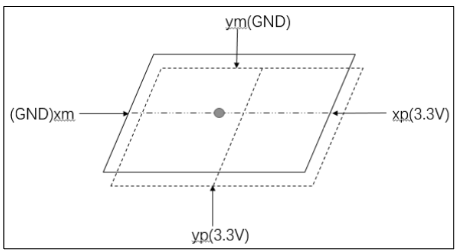
image-20230922200403814

  • 根据分压原理,计算电阻值。假设材料长度和电阻成线性关系,则可以计算出相对距离
  • 电阻屏分为上下两层薄膜,一层通电时,另一层在按压时作为探针获取分压值,从而进行计算
  • 电阻屏和LCD使用之前,需要进行五点校准二者的相对位置

1.1.1 电阻屏数据

按下时:

1
2
3
4
5
EV_KEY    BTN_TOUCH       1             /* 按下 */ 
EV_ABS ABS_PRESSURE 1 /* 压力值,可以上报,也可以不报,可以是其他压力值 */
EV_ABS ABS_X x_value /* X 坐标 */
EV_ABS ABS_Y y_value /* Y 坐标 */
EV_SYNC 0 0 /* 同步事件 */

松开时:

1
2
3
EV_KEY    BTN_TOUCH         0           /* 松开 */ 
EV_ABS ABS_PRESSURE 0 /* 压力值,可以上报,也可以不报 */
EV_SYNC 0 0 /* 同步事件 */

1.2 电容屏

image-20230922202123424

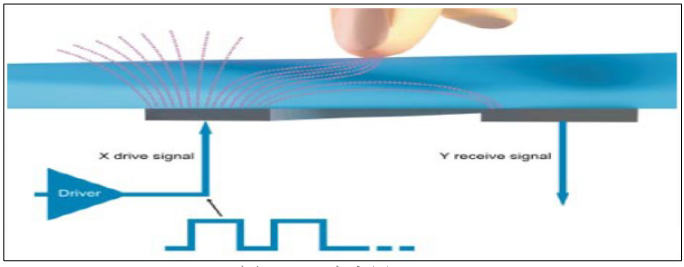
电容屏中有一个控制芯片,它会周期性产生驱动信号,接收电极接收到信号, 并可测量电荷大小。当电容屏被按下时,相当于引入了新的电容,从而影响了接 收电极接收到的电荷大小。主控芯片根据电荷大小即可计算出触点位置,应用开发人员只需要编写程序,通过 I2C 读取芯片寄存器即可得到这些数据。

1.2.1 电容屏多点触摸上报数据

1
2
3
4
5
6
7
8
9
EV_ABS    ABS_MT_SLOT            0    // 这表示“我要上报一个触点信息了”,用来分隔触点信息 
EV_ABS ABS_MT_TRACKING_ID 45 // 这个触点的 ID 是 45,由控制芯片分配
EV_ABS ABS_MT_POSITION_X x[0] // 触点 X 坐标
EV_ABS ABS_MT_POSITION_Y y[0] // 触点 Y 坐标
EV_ABS ABS_MT_SLOT 1 // 这表示“我要上报一个触点信息了”,用来分隔触点信息
EV_ABS ABS_MT_TRACKING_ID 46 // 这个触点的 ID 是 46,由控制芯片分配
EV_ABS ABS_MT_POSITION_X x[1] // 触点 X 坐标
EV_ABS ABS_MT_POSITION_Y y[1] // 触点 Y 坐标
EV_SYNC SYN_REPORT 0 // 全部数据上报完毕

当 ID 为 45 的触点正在移动时:

1
2
3
EV_ABS    ABS_MT_SLOT            0    // 表示“要上报一个触点信息了”,之前上报过ID,就不用再上报ID 
EV_ABS ABS_MT_POSITION_X x[0] // 触点 X 坐标
EV_SYNC SYN_REPORT 0 // 全部数据上报完毕

松开 ID 为 45 的触点时(在前面 slot 已经被设置为 0,这里不需要再重新设置 slot,slot 就像一个全局变量一样:如果它没变化的话,就无需再次设置):

1
2
EV_ABS    ABS_MT_TRACKING_ID     -1   // slot对应的ID是45,这里ID=-1,表示ID=45的触点被松开了
EV_SYNC SYN_REPORT 0 // 全部数据上报完毕

最后,松开 ID 为 46 的触点:

1
2
3
EV_ABS    ABS_MT_SLOT            1    // 这表示“我要上报一个触点信息了”, slot 1 的 ID 为 46 
EV_ABS ABS_MT_TRACKING_ID -1 // ID 为-1,表示 slot 1 被松开,即ID为46的触点被松开
EV_SYNC SYN_REPORT // 全部数据上报完毕

1.2.2 电容屏实际数据分析

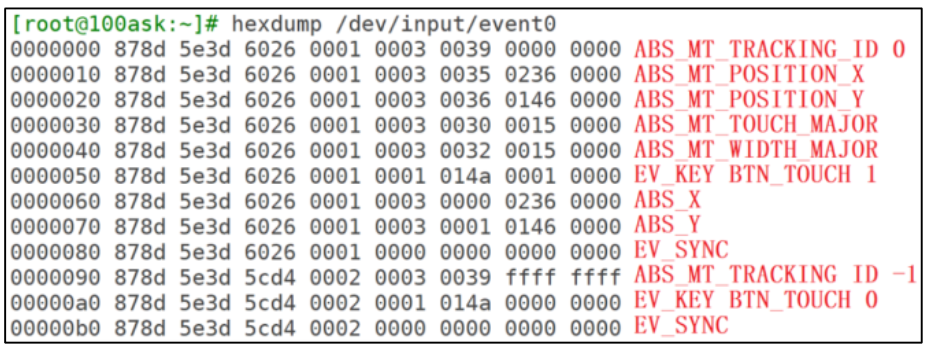
电容屏单点击:

image-20230922204156789

  • xx_MAJOR:用来描述触点大小,不是常用数据
  • ABS_X/ABS_Y:用来兼容老版本应用程序,电阻屏就是使用这个类型的数据

两点触发:
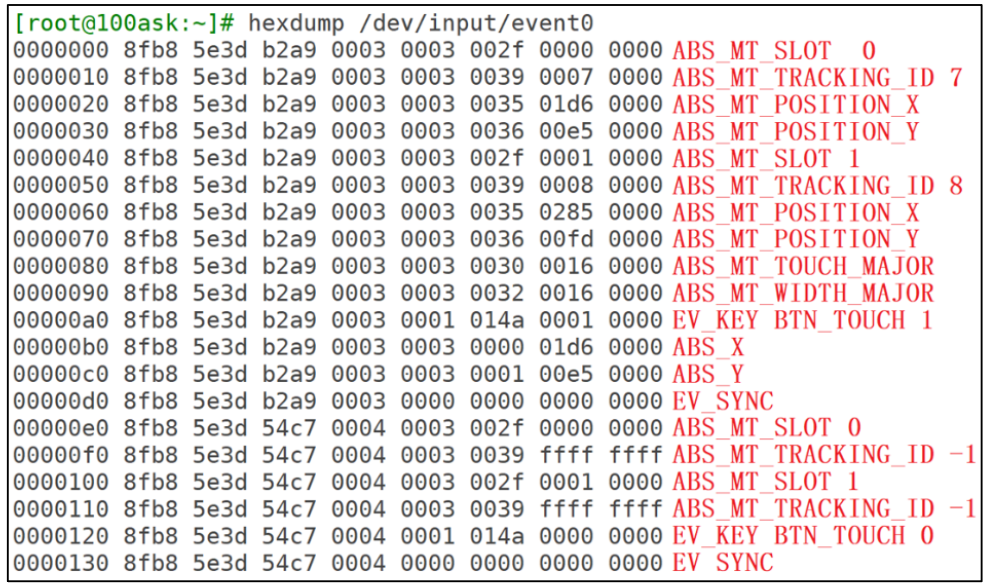
image-20230922204750931

  • 为了兼容老程序,它也上报了 ABS_X、ABS_Y 数据,但是只上报第 1 个触点的数据

2.触摸屏开源库-tslib

2.1 tslib框架分析

2.1.1 目录结构

tslib的主要代码文件结构:
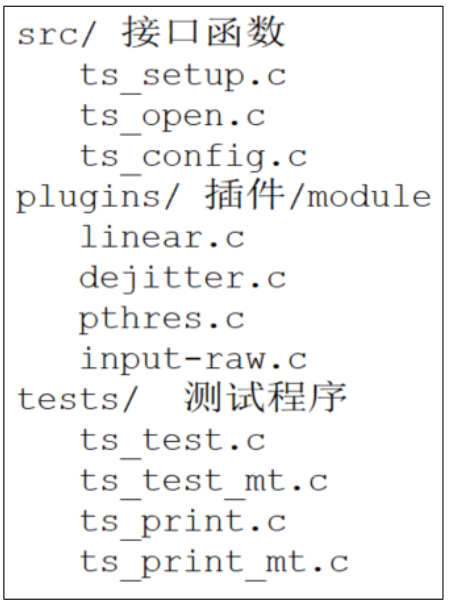
image-20230922215156184

  • 核心在于plugins目录,该目录下每一个文件都是一个module,每个module都提供2个函数:readread_mt前者用于读取单点触摸屏数据,后者用于读取多点触摸屏数据
  • test目录下是示例程序

2.1.2 框架结构

image-20230922224515068

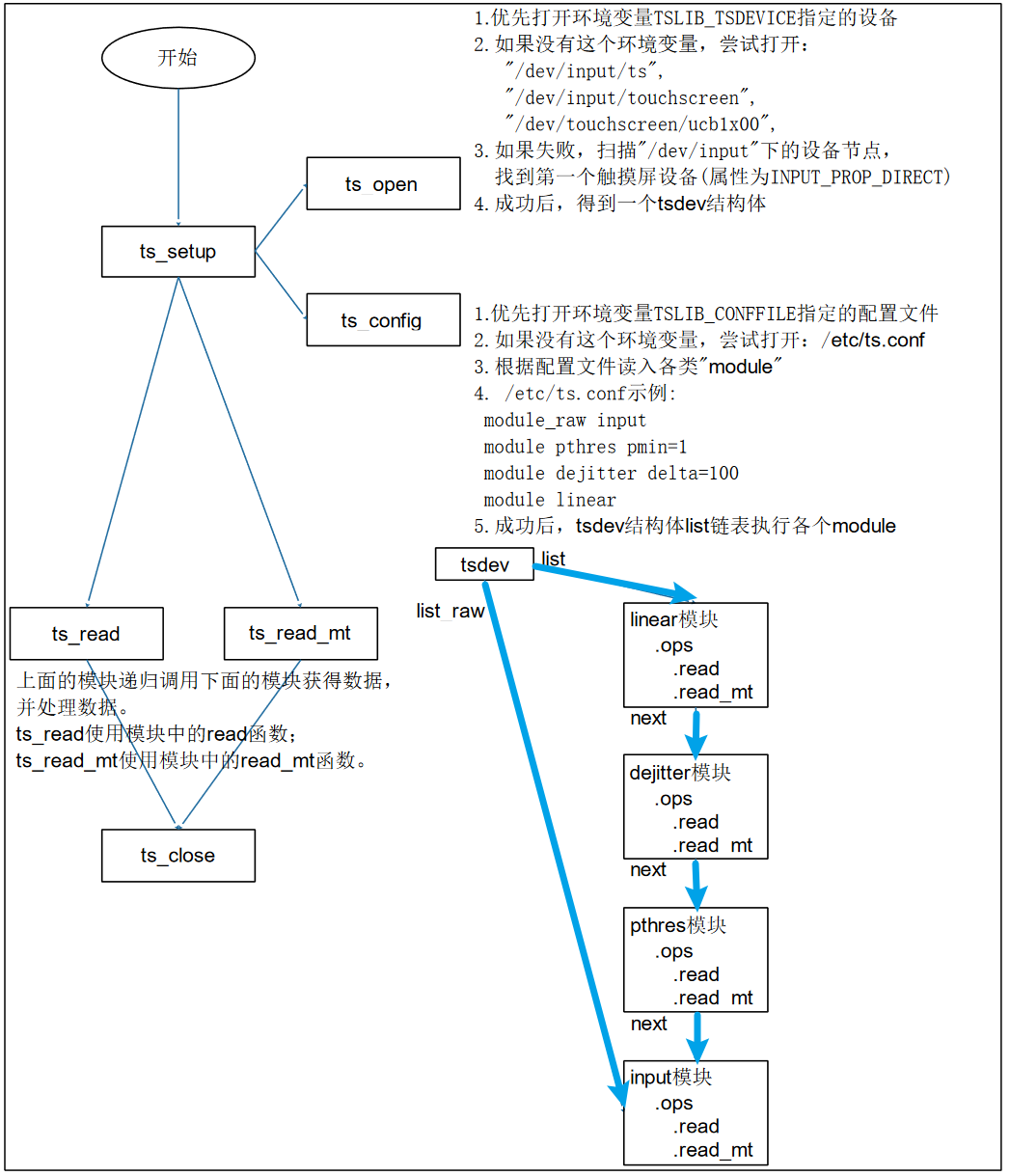
  1. 调用ts_open后,可以打开某个设备节点,构造出一个 tsdev 结构体:

    1
    2
    3
    4
    5
    6
    7
    8
    9
    10
    11
    12
    13
    14
    15
    16
    17
    18
    19
    20
    struct tsdev {
    int fd;
    char *eventpath; // 设备文件路径
    struct tslib_module_info *list; // 数据处理路径链表
    /* points to position in 'list' where raw reads
    * come from. default is the position of the
    * ts_read_raw module.
    */
    struct tslib_module_info *list_raw; //一般指向最底层的数据处理模块
    unsigned int res_x;
    unsigned int res_y;
    int rotation;
    };

    struct tslib_module_info {
    struct tsdev *dev;
    struct tslib_module_info *next; /* next module in chain */
    void *handle; /* dl handle */
    const struct tslib_ops *ops;
    };
  2. 调用ts_config读取配置文件,假设/etc/ts.conf的内容如下:

    1
    2
    3
    4
    module_raw input 
    module pthres pmin=1
    module dejitter delta=100
    module linear
    • 每行表示一个module或moduel_raw。对于module都会插入tsdev.list表头(读取文件从上到下进行头插)
    • 对于所有的module_raw都会插入tsdev.list_raw链表头,一般都只有一个module_raw
    1
    2
    3
    4
    5
    6
    7
    int __ts_attach(struct tsdev *ts, struct tslib_module_info *info)
    {
    info->dev = ts;
    info->next = ts->list;
    ts->list = info;
    return 0;
    }
  3. 调用ts_read或者ts_read_mt都是通过tsdev.list中的模块来处理数据,该过程是一个递归向下调用的过程:

    1
    2
    3
    4
    5
    6
    7
    8
    static int linear_read(struct tslib_module_info *info, struct ts_sample *samp,
    int nr_samples)
    {
    struct tslib_linear *lin = (struct tslib_linear *)info;
    int ret;
    int xtemp, ytemp;
    //调用list中的下一个模块读取数据
    ret = info->next->ops->read(info->next, samp, nr_samples);

2.2 编译和安装tslib

根据之前的知识,知道编译和安装库应该执行:

1
2
3
./configure --host=arm-buildroot-linux-gnueabihf --prefix=$PWD/tmp 
make
make install

ts_config函数首先会在环境变量TSLIB_CONFFILE指定的目录中寻找配置文件ts.conf,如果没有该环境变量,则会在宏定义TS_CONF中寻找配置文件ts.conf

1
2
3
4
5
6
7
8
9
10
if ((conffile = getenv("TSLIB_CONFFILE")) == NULL) {
conffile = strdup(TS_CONF);
if (conffile) {
strdup_allocated = 1;
} else {
ts_error("Couldn't find tslib config file: %s\n",
strerror(errno));
return -1;
}
}

如果按照之前的命令去编译库,指定prefix=$PWD/tmp,则查找宏定义TS_CONF的值发现:

1
2
3
4
5
grep -nwr "TS_CONF" .

TS_CONF = ${sysconfdir}/ts.conf
sysconfdir = ${prefix}/etc
prefix='/home/book/vscodeFile/embbed_study/11_input/02_tslib/tslib-1.21/tmp'

这意味着在开发板上配置文件ts.conf需要放在/home/book/vscodeFile/embbed_study/11_input/02_tslib/tslib-1.21/tmp/etc这样一个目录下,这显然太麻烦了。为了将ts.conf放在开发板的/etc/目录时能够找的到,需要改变一下prefix参数值:

1
2
3
./configure --host=arm-buildroot-linux-gnueabihf --prefix=/
make
make install prefix=$PWD/tmp

按照上述命令,在执行make install会报错:

1
2
3
4
5
6
7
8
9
libtool:   error: error: cannot install 'linear.la' to a directory not ending in //lib/ts
Makefile:813: recipe for target 'install-pluginexecLTLIBRARIES' failed
make[2]: *** [install-pluginexecLTLIBRARIES] Error 1
make[2]: 离开目录“/home/book/vscodeFile/embbed_study/11_input/02_tslib/tslib-1.21/plugins”
Makefile:1098: recipe for target 'install-am' failed
make[1]: *** [install-am] Error 2
make[1]: 离开目录“/home/book/vscodeFile/embbed_study/11_input/02_tslib/tslib-1.21/plugins”
Makefile:488: recipe for target 'install-recursive' failed
make: *** [install-recursive] Error 1

查找对应plugins/Makefile对应的代码:

1
2
3
4
5
6
7
8
9
10
11
12
13
install-pluginexecLTLIBRARIES: $(pluginexec_LTLIBRARIES)
@$(NORMAL_INSTALL)
@list='$(pluginexec_LTLIBRARIES)'; test -n "$(pluginexecdir)" || list=; \
list2=; for p in $$list; do \
if test -f $$p; then \
list2="$$list2 $$p"; \
else :; fi; \
done; \
test -z "$$list2" || { \
echo " $(MKDIR_P) '$(DESTDIR)$(pluginexecdir)'"; \
$(MKDIR_P) "$(DESTDIR)$(pluginexecdir)" || exit 1; \
echo " $(LIBTOOL) $(AM_LIBTOOLFLAGS) $(LIBTOOLFLAGS) --mode=install $(INSTALL) $(INSTALL_STRIP_FLAG) $$list2 '$(DESTDIR)$(pluginexecdir)'"; \
$(LIBTOOL) $(AM_LIBTOOLFLAGS) $(LIBTOOLFLAGS) --mode=install $(INSTALL) $(INSTALL_STRIP_FLAG) $$list2 "$(DESTDIR)$(pluginexecdir)"; \

这段代码在安装动态库文件pluginexec_LTLIBRARIES,原因大概率是目标目录$(DESTDIR)$(pluginexecdir)设置的有问题,通过查找DESTDIR发现:

1
2
3
4
5
6
7
8
   The second method involves providing the `DESTDIR' variable.  For
example, `make install DESTDIR=/alternate/directory' will prepend
`/alternate/directory' before all installation names. The approach of
`DESTDIR' overrides is not required by the GNU Coding Standards, and
does not work on platforms that have drive letters. On the other hand,
it does better at avoiding recompilation issues, and works well even
when some directory options were not specified in terms of `${prefix}'
at `configure' time.

所以,可以通过DESTDIR来指定安装目录:

1
make install DESTDIR=$PWD/tmp

这样,即可实现安装在当前目录下,同时配置文件的寻找路径为/etc/

2.2.1 将动态库和可执行程序放到开发板上

1
2
3
4
cp /mnt/tslib-1.21/tmp/lib/*so* -d /lib 
cp /mnt/tslib-1.21/tmp/lib/ts/*so* -d /lib
cp /mnt/tslib-1.21/tmp/bin/* /bin
cp /mnt/tslib-1.21/tmp/etc/ts.conf -d /etc

2.3 使用tslib读取多点触摸数据

1
2
3
4
5
6
7
8
9
10
11
12
13
14
15
16
17
18
19
20
21
22
23
24
25
26
27
28
29
30
31
//触点信息结构体
struct ts_sample_mt {
int x;
int y;
unsigned int pressure;
int slot;
int tracking_id;

int tool_type;
int tool_x;
int tool_y;
unsigned int touch_major;
unsigned int width_major;
unsigned int touch_minor;
unsigned int width_minor;
int orientation;
int distance;
int blob_id;

struct timeval tv;

/* BTN_TOUCH state */
short pen_down;

/* valid is set != 0 if this sample
* contains new data; see below for the
* bits that get set.
* valid is set to 0 otherwise
*/
short valid;
};

参考ts_test_mt.c,编写一个读取触点程序,实现如果有两个触点,则输出两个触点的距离的功能:

1
2
3
4
5
6
7
8
9
10
11
12
13
14
15
16
17
18
19
20
21
22
23
24
25
26
27
28
29
30
31
32
33
34
35
36
37
38
39
40
41
42
43
44
45
46
47
48
49
struct tsdev *ts;
struct input_absinfo slot;
int i, max_slots, ret, touch_cnt;
int point_pressed[20];
struct ts_sample_mt **sample_mt, **pre_sample_mt;

//打开触摸屏设备文件
ts = ts_setup(NULL, 0);
//读取触摸屏的配置信息
if(ioctl(ts_fd(ts), EVIOCGABS(ABS_MT_SLOT), &slot) < 0)
{
perror("ioctl EVIOCGABS");
ts_close(ts);
return errno;
}
// 获取触摸屏最大支持的触点数(15 - 0 + 1)
max_slots = slot.maximum - slot.minimum + 1;
//分配内存
sample_mt = malloc(sizeof(struct ts_sample_mt *));
*sample_mt = calloc(max_slots, sizeof(struct ts_sample_mt));
pre_sample_mt = malloc(sizeof(struct ts_sample_mt *));
*pre_sample_mt = calloc(max_slots, sizeof(struct ts_sample_mt));
for(i = 0; i < max_slots; i++)
(*pre_sample_mt)[i].valid = 0;


while (1)
{
// 读取max_slots个触点的信息,读取1次
ret = ts_read_mt(ts, sample_mt, max_slots, 1);
// 将最新的有效信息更新到pre_sample_mt中
for(i = 0; i < max_slots; i++)
if((*sample_mt)[i].valid)
memcpy(&pre_sample_mt[0][i], &sample_mt[0][i], sizeof(struct ts_sample_mt));

//point_pressed中保存所有还在接触的触点下标
touch_cnt = 0;
for(i = 0; i < max_slots; i++)
{
if(pre_sample_mt[0][i].valid && pre_sample_mt[0][i].tracking_id != -1)
point_pressed[touch_cnt++] = i;
}
// 如果有两个触点,则计算距离
if(touch_cnt == 2)
{
printf("distance %08d\n", distance(&pre_sample_mt[0][point_pressed[0]], &pre_sample_mt[0][point_pressed[1]]));
}

}

之所以使用pre_sample_mt来备份信息,是因为如果触点接触之后没有移动,则第二次读取时该触点对应的有效位valid为非(不使用pre_sample_mt的话,判断tracking_id也可以实现类似的功能)