0%

I2C应用编程

1. I2C协议

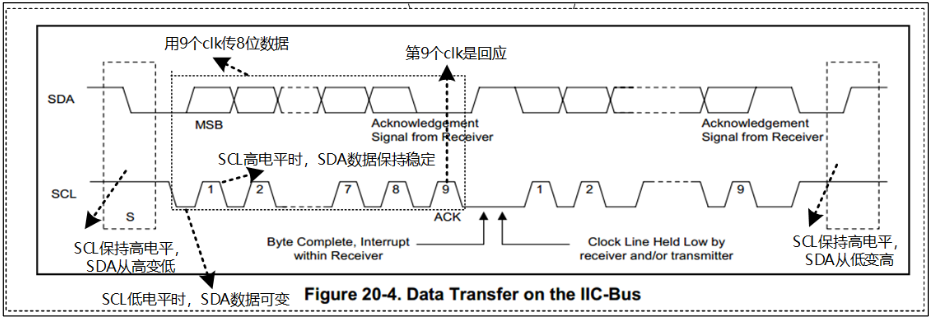
image-20231013195434388

  • 起始信号
  • 停止信号
  • 传输1Bit数据时的信号
  • 应答信号(0:应答,1:非应答

1.1 I2C写操作

image-20231013200107130

(白色背景:主→从;灰色背景:从→主)

1.2 I2C读操作

image-20231013200321711

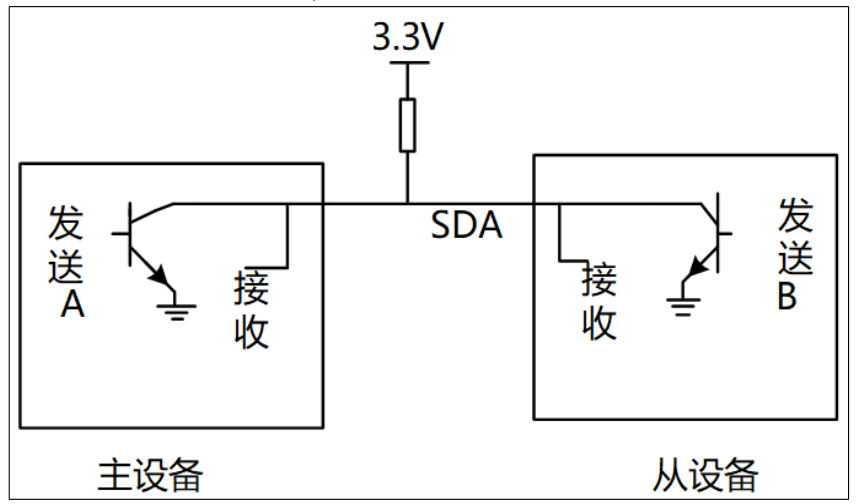
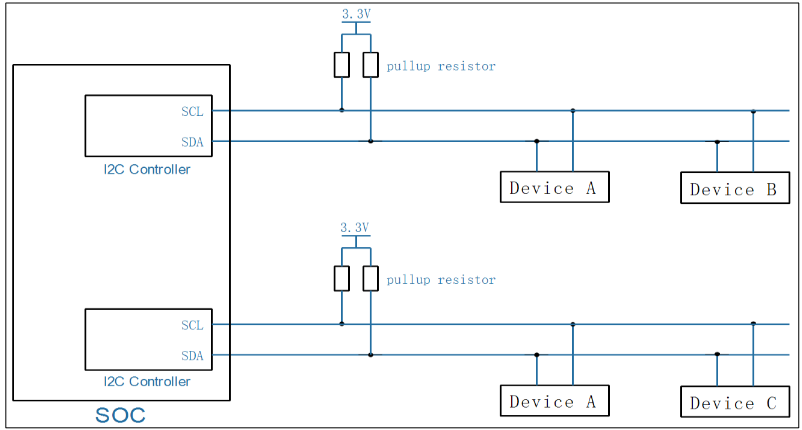
1.3 I2C引脚的硬件设计

image-20231013200615311

真值表:

A B SDA
0 0 1
0 1 0
1 0 0
1 1 0
  • 使用开漏电路,可以防止设备引脚存在电压差时短路的出现

  • 使用上拉电路,可以在设备都没有拉低信号时,保证引线不浮空

  • SCL采用同样的设计,是因为SCL不仅仅由主设备进行控制,在少数情况下也可能由从设备进行控制,如从设备需要主设备等待自己时,可能会选择将SCL拉低

2.SMBus协议(System Management Bus)

SMBus 最初的目的是为智能电池、充电电池、其他微控制器之间的通信链路而定义的。 SMBus 也被用来连接各种设备,包括电源相关设备,系统传感器,EEPROM 通讯设备等。SMBus 是基于 I2C 协议的,SMBus 要求更严格,SMBus 是 I2C 协议的子集。

2.1 与I2C的区别

  • VDD 的极限值不一样

    • I2C 协议:范围很广,甚至讨论了高达 12V 的情况
    • SMBus:1.8V~5V
  • 最小时钟频率、最大的 Clock Stretching

    • Clock Stretching:某个设备需要更多时间进行内部的处理时,它可以把 SCL 拉低占住 I2C 总线
    • I2C :时钟频率最小值无限制,Clock Stretching 时长也没有限制
    • SMBus :时钟频率最小值是 10KHz,Clock Stretching 的最大时间值也有限制
  • 地址回应(Address Acknowledge):一个 I2C 设备接收到它的设备地址后, 是否必须发出回应信号?

    • I2C:没有强制要求必须发出回应信号
    • SMBus:强制要求必须发出回应信号,这样对方才知道该设备的状态: busy,failed,或是被移除了
  • SMBus 协议明确了数据的传输格式

    • I2C :它只定义了怎么传输数据,但是并没有定义数据的格式,这完全由设备来定义
    • SMBus:定义了几种数据格式
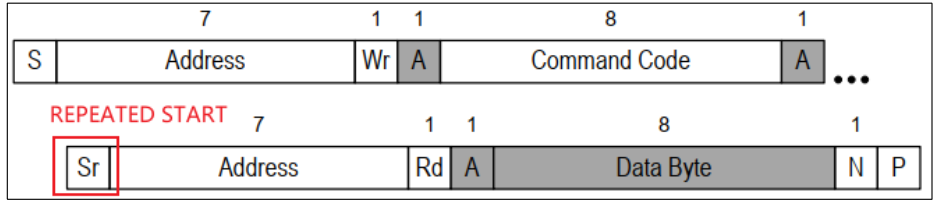
  • REPEATED START Condition(重复发出 S 信号)

    • 在连续的写/读之间,可以不发出 P 信号,而是直接发出 S 信号:这个 S 信号就是 REPEATED START

    image-20231013205135864

  • SMBus Low Power Version:SMBus 也有低功耗的版本

2.2 SMBus 协议分析

Functionality flag 是 Linux 的某个 I2C 控制器驱动所支持的功能。比如 Functionality flag: I2C_FUNC_SMBUS_QUICK,表示需要 I2C 控制器支持 SMBus Quick Command。

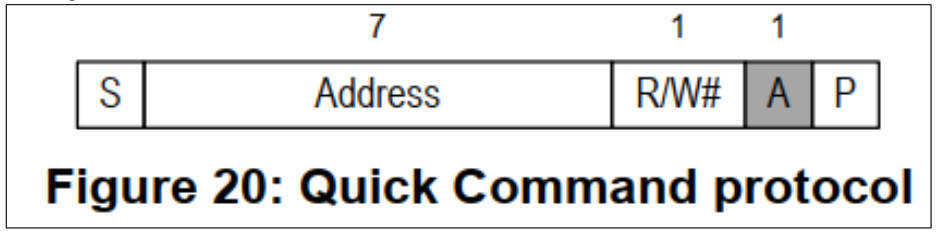
(1) SMBus Quick Command

image-20231013205740269

只是用来发送一位数据:R/W#本意是用来表示读或写,但是在 SMBus 里可以用来表示其他含义;比如某些开关设备,可以根据这一位来决定是打开还是关闭。

1
Functionality flag: I2C_FUNC_SMBUS_QUICK

(2) SMBus Receive Byte

image-20231013210229543

和I2C读取字节相同,对应I2C-tools 中的函数:i2c_smbus_read_byte()。读取一个字节,Host adapter 接收到一个字节后不需要发出回应信号。

1
Functionality flag: I2C_FUNC_SMBUS_READ_BYTE

(3) SMBus Send Byte

image-20231013210406105

和I2C写字节相同,对应I2C-tools 中的函数:i2c_smbus_write_byte()。发送一个字节。

1
Functionality flag: I2C_FUNC_SMBUS_WRITE_BYTE

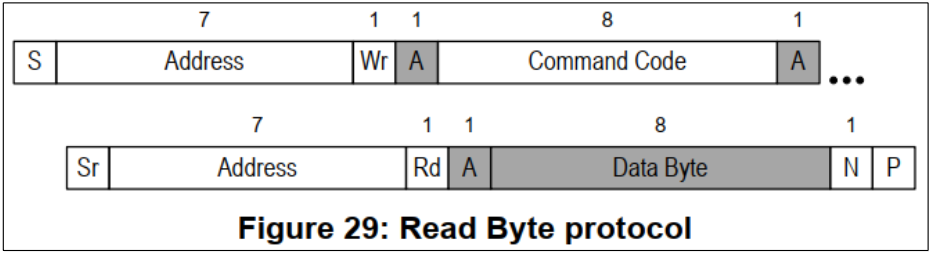
(4) SMBus Read Byte

image-20231013210539307

I2C-tools 中的函数:i2c_smbus_read_byte_data()。先发出 Command Code(它一般表示芯片内部的寄存器地址),再读取一个字节的数据。

1
Functionality flag: I2C_FUNC_SMBUS_READ_BYTE_DATA

(5) SMBus Read Word

image-20231013210747692

I2C-tools 中的函数:i2c_smbus_read_word_data()。先发出 Command Code(它一般表示芯片内部的寄存器地址),再读取 2 个字节的数据

1
Functionality flag: I2C_FUNC_SMBUS_READ_WORD_DATA

(6) SMBus Write Byte

image-20231013210922202

I2C-tools 中的函数:i2c_smbus_write_byte_data()。先发出 Command Code(它一般表示芯片内部的寄存器地址),再发出 1 个字节的数据

1
Functionality flag: I2C_FUNC_SMBUS_WRITE_BYTE_DATA

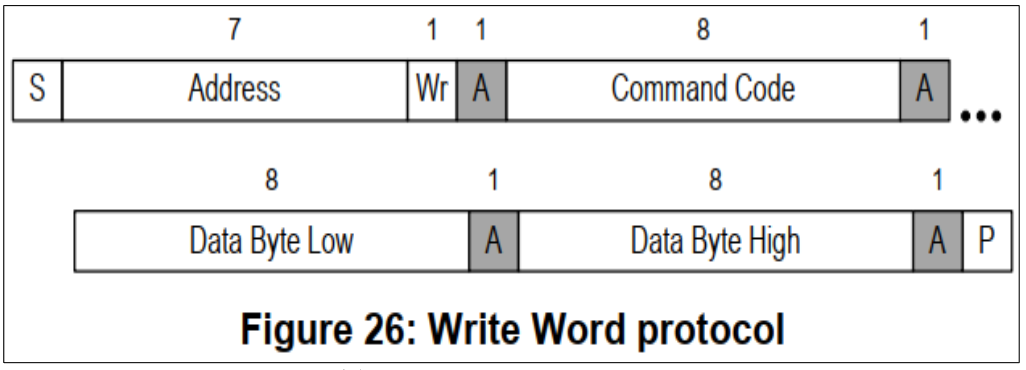
(7) SMBus Write Word

image-20231013211028442

I2C-tools 中的函数:i2c_smbus_write_word_data()。先发出 Command Code(它一般表示芯片内部的寄存器地址),再发出 2 个字节的数据。

1
Functionality flag: I2C_FUNC_SMBUS_WRITE_WORD_DATA

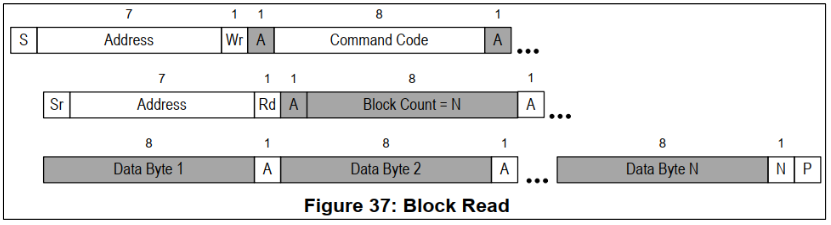
(8) SMBus Block Read

image-20231013211214615

I2C-tools 中的函数:i2c_smbus_read_block_data()。先发出 Command Code(它一般表示芯片内部的寄存器地址),再发起度操作:

  • 先读到一个字节(Block Count),表示后续要读的字节数
  • 然后读取全部数据
1
Functionality flag: I2C_FUNC_SMBUS_READ_BLOCK_DATA
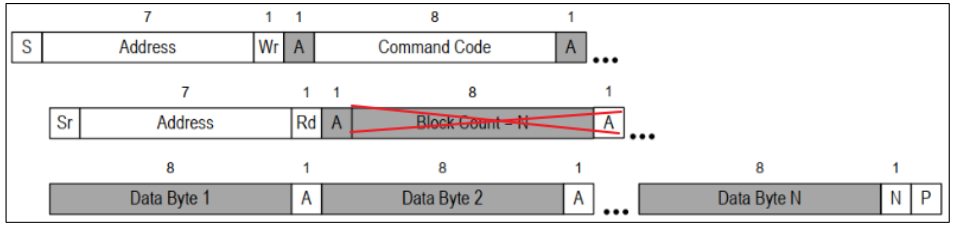
PS:I2C Block Read

在一般的 I2C 协议中,也可以连续读出多个字节。它跟 SMBus Block Read 的差别在于从设备发出的第 1 个数据不是长度 N,如下图所示:

image-20231013211836310

I2C-tools 中的函数:i2c_smbus_read_i2c_block_data()

1
Functionality flag: I2C_FUNC_SMBUS_READ_I2C_BLOCK

(9) SMBus Block Write

image-20231013211357246

I2C-tools 中的函数:i2c_smbus_write_block_data()。先发出 Command Code(它一般表示芯片内部的寄存器地址),再发出 1 个字节的 Byte Conut(表示后续要发出的数据字节数),最后发出全部数据。

1
Functionality flag: I2C_FUNC_SMBUS_WRITE_BLOCK_DATA
PS:I2C Block Write

在一般的 I2C 协议中,也可以连续发出多个字节。它跟 SMBus Block Write 的差别在于发出的第 1 个数据不是长度 N,如下图所示:

image-20231013211534690

I2C-tools 中的函数:i2c_smbus_write_i2c_block_data()

1
Functionality flag: I2C_FUNC_SMBUS_WRITE_I2C_BLOCK

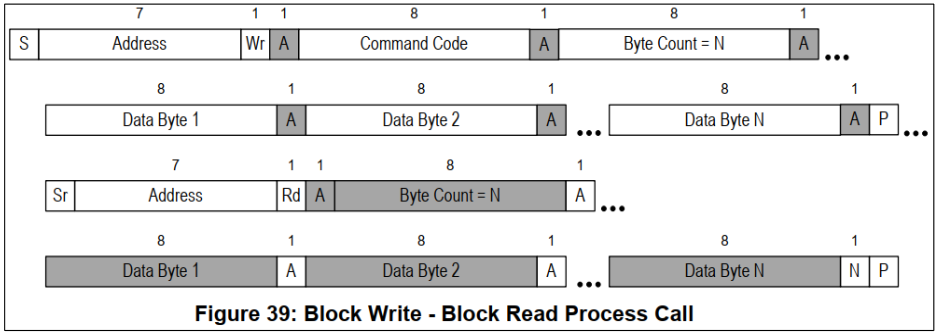
(10) SMBus Block Write - Block Read Process Call

image-20231013212003873

先写一块数据,再读一块数据。

1
Functionality flag: I2C_FUNC_SMBUS_BLOCK_PROC_CALL

(11) Packet Error Checking (PEC)

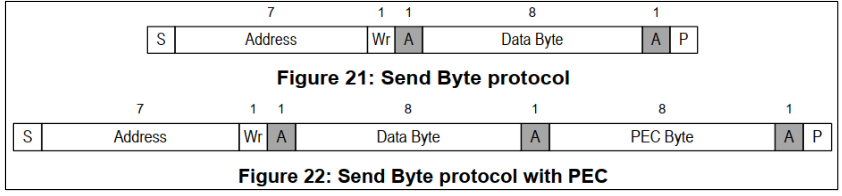
PEC 是一种错误校验码,如果使用 PEC,那么在 P 信号之前,数据发送方要发送一个字节的 PEC 码(它是 CRC-8 码)。以 SMBus Send Byte 为例,下图中, 一个未使用 PEC,另一个使用 PEC:

image-20231013212158627

PS:

因为很多设备都实现了 SMBus,而不是更宽泛的 I2C 协议,所以优先使用 SMBus。即使 I2C 控制器没有实现 SMBus,软件方面也是可以使用 I2C 协议来 模拟 SMBus。所以:Linux 建议优先使用 SMBus

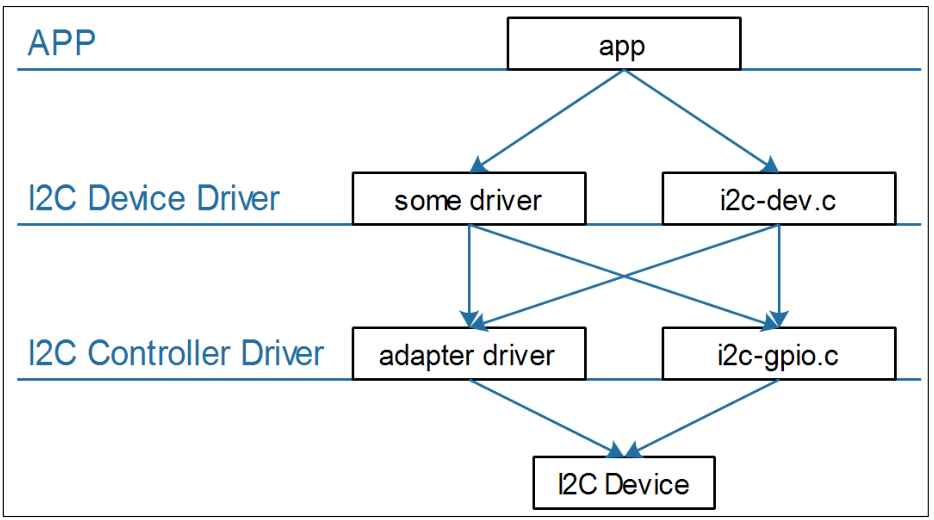
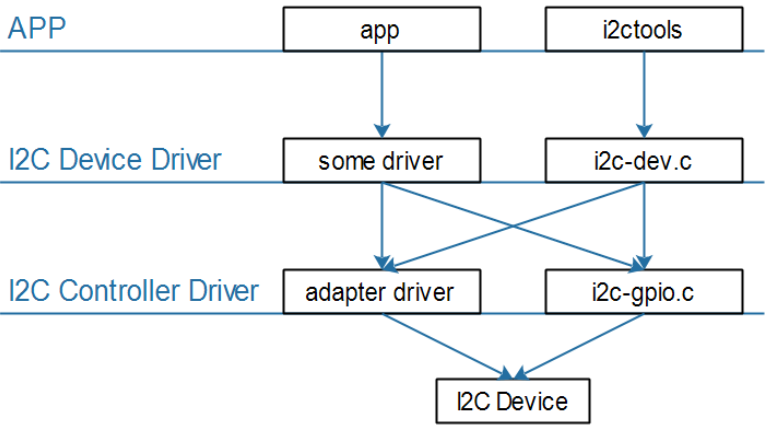
3.Linux系统中I2C的软件框架

image-20231013201531293

  • 怎么理解I2C Device Driver和I2C Controller Driver

    • I2C Device Driver用于针对每一种I2C设备编写相应的数据收发格式
    • I2C Controller Driver用于通用的产生I2C协议的各类信号
  • APP 可以通过两类驱动程序访问设备

    • I2C 设备自己的驱动程序
    • 内核自带的 i2c-dev.c 驱动程序,它是 i2c 控制器驱动程序暴露给用户空间的驱动程序(i2c-dev.c)
  • I2C Device Driver

    • I2C 设备自己的驱动程序
    • 内核自带的 i2c-dev.c 驱动程序,它是 i2c 控制器驱动程序暴露给用户空间的驱动程序(i2c-dev.c)
  • I2C Controller Driver

    • 芯片 I2C 控制器的驱动程序(称为 adapter)
    • 使用 GPIO 模拟的 I2C 控制器驱动程序(i2c-gpio.c)

4. I2C应用编程

4.1 重要结构体

image-20231017195937671

参考I2C硬件结构体,每一个I2C Controller使用i2c_adapter来表示:

1
2
3
4
5
6
7
8
9
10
11
12
13
14
15
16
17
18
19
20
21
22
23
24
25
struct i2c_adapter {
struct module *owner;
unsigned int class; /* classes to allow probing for */
const struct i2c_algorithm *algo; /* the algorithm to access the bus */
void *algo_data;

/* data fields that are valid for all devices */
const struct i2c_lock_operations *lock_ops;
struct rt_mutex bus_lock;
struct rt_mutex mux_lock;

int timeout; /* in jiffies */
int retries;
struct device dev; /* the adapter device */

int nr;
char name[48];
struct completion dev_released;

struct mutex userspace_clients_lock;
struct list_head userspace_clients;

struct i2c_bus_recovery_info *bus_recovery_info;
const struct i2c_adapter_quirks *quirks;
};

其中重要的成员:

  • algo:指定控制器传输数据使用的函数,用来收发I2C数据
  • nr:第几个I2C Controller

i2c_algorithm结构体原型:

1
2
3
4
5
6
7
8
9
10
11
12
13
14
15
16
17
18
19
20
21
struct i2c_algorithm {
/* If an adapter algorithm can't do I2C-level access, set master_xfer
to NULL. If an adapter algorithm can do SMBus access, set
smbus_xfer. If set to NULL, the SMBus protocol is simulated
using common I2C messages */
/* master_xfer should return the number of messages successfully
processed, or a negative value on error */
int (*master_xfer)(struct i2c_adapter *adap, struct i2c_msg *msgs,
int num);
int (*smbus_xfer) (struct i2c_adapter *adap, u16 addr,
unsigned short flags, char read_write,
u8 command, int size, union i2c_smbus_data *data);

/* To determine what the adapter supports */
u32 (*functionality) (struct i2c_adapter *);

#if IS_ENABLED(CONFIG_I2C_SLAVE)
int (*reg_slave)(struct i2c_client *client);
int (*unreg_slave)(struct i2c_client *client);
#endif
};

从结构体i2c_algorithm中发现和I2C从设备相关的结构体i2c_client:

1
2
3
4
5
6
7
8
9
10
11
12
13
14
15
16
17
18
19
20
21
22
/*flags for the client struct: */
#define I2C_CLIENT_PEC 0x04 /* Use Packet Error Checking */
#define I2C_CLIENT_TEN 0x10 /* we have a ten bit chip address */
/* Must equal I2C_M_TEN below */
#define I2C_CLIENT_SLAVE 0x20 /* we are the slave */
#define I2C_CLIENT_WAKE 0x80 /* for board_info; true iff can wake */
#define I2C_CLIENT_SCCB 0x9000 /* Use Omnivision SCCB protocol */
/* Must match I2C_M_STOP|IGNORE_NAK */
struct i2c_client {
unsigned short flags; /* div., see below */
unsigned short addr; /* chip address - NOTE: 7bit */
/* addresses are stored in the */
/* _LOWER_ 7 bits */
char name[I2C_NAME_SIZE];
struct i2c_adapter *adapter; /* the adapter we sit on */
struct device dev; /* the device structure */
int irq; /* irq issued by device */
struct list_head detected;
#if IS_ENABLED(CONFIG_I2C_SLAVE)
i2c_slave_cb_t slave_cb; /* callback for slave mode */
#endif
};

在该结构体中最重要的成员:

  • addr:表示该I2C设备的设备地址
  • adapter:表示该I2C设备挂载在哪个I2C Controller下

结构体i2c_msg封装了需要传输的数据:

1
2
3
4
5
6
7
8
9
10
11
12
13
14
15
struct i2c_msg {
__u16 addr; /* slave address */
__u16 flags; /* 表示读或写 */
#define I2C_M_RD 0x0001 /* read data, from slave to master */
/* I2C_M_RD is guaranteed to be 0x0001! */
#define I2C_M_TEN 0x0010 /* this is a ten bit chip address */
#define I2C_M_RECV_LEN 0x0400 /* length will be first received byte */
#define I2C_M_NO_RD_ACK 0x0800 /* if I2C_FUNC_PROTOCOL_MANGLING */
#define I2C_M_IGNORE_NAK 0x1000 /* if I2C_FUNC_PROTOCOL_MANGLING */
#define I2C_M_REV_DIR_ADDR 0x2000 /* if I2C_FUNC_PROTOCOL_MANGLING */
#define I2C_M_NOSTART 0x4000 /* if I2C_FUNC_NOSTART */
#define I2C_M_STOP 0x8000 /* if I2C_FUNC_PROTOCOL_MANGLING */
__u16 len; /* msg length */
__u8 *buf; /* pointer to msg data */
};
  • flags:该字段为0表示写,为I2C_M_RD表示读

4.2 使用I2C-Tools访问I2C设备

image-20231023194336992

4.2.1 体验I2C-Tools可执行程序

(1) i2cdectect-列出设备上I2C设备的信息
1
2
3
4
5
6
7
8
9
// 列出当前的 I2C Adapter(或称为 I2C Bus、I2C Controller) 
i2cdetect -l

// 打印某个 I2C Adapter 的 Functionalities, I2CBUS 为 0、1、2 等整数
i2cdetect -F I2CBUS

// 看看有哪些 I2C 设备, I2CBUS 为 0、1、2 等整数
// --表示没有该地址对应的设备,UU表示有该设备并且它已经有驱动程序,数值表示有该设备但是没有对应的设备驱动
i2cdetect -y -a I2CBUS
(2) i2cget-读数据
1
2
3
4
5
6
7
8
9
10
11
// 读一个字节: I2CBUS 为 0、1、2 等整数, 表示 I2C Bus; CHIP-ADDRESS 表示设备地址 
i2cget -f -y I2CBUS CHIP-ADDRESS

// 读某个地址上的一个字节:
// I2CBUS 为 0、1、2 等整数, 表示 I2C Bus
// CHIP-ADDRESS 表示设备地址
// DATA-ADDRESS: 芯片上寄存器地址
// MODE:有 2 个取值:
// b:使用`SMBus Read Byte`先发出 DATA-ADDRESS, 再读一个字节, 中间无 P 信号
// c:先 write byte, 在 read byte,中间有 P 信号
i2cget -f -y I2CBUS CHIP-ADDRESS DATA-ADDRESS MODE
(3) i2cset-写数据
1
2
3
4
5
6
7
8
9
10
11
12
13
14
15
16
17
18
19
20
21
22
23
24
25
26
27
28
29
30
31
// 写一个字节: I2CBUS 为 0、1、2 等整数, 表示 I2C Bus; CHIP-ADDRESS 表示设备地址 
// DATA-ADDRESS 就是要写的数据
i2cset -f -y I2CBUS CHIP-ADDRESS DATA-ADDRESS


// 给 address 写 1 个字节或者 1 个字(address, value):
// I2CBUS 为 0、1、2 等整数, 表示 I2C Bus; CHIP-ADDRESS 表示设备地址
// DATA-ADDRESS: 8 位芯片寄存器地址;
// VALUE: 8 位数值 或者 16 位数据
// MODE: b表示写字节,w表示写字
i2cset -f -y I2CBUS CHIP-ADDRESS DATA-ADDRESS VALUE b or w


// SMBus Block Write:给 address 写 N 个字节的数据
// 发送的数据有:address, N, value1, value2, ..., valueN
// 跟`I2C Block Write`相比, 需要发送长度 N
// I2CBUS 为 0、1、2 等整数, 表示 I2C Bus; CHIP-ADDRESS 表示设备地址
// DATA-ADDRESS: 8 位芯片寄存器地址;
// VALUE1~N: N 个 8 位数值
// MODE: s
i2cset -f -y I2CBUS CHIP-ADDRESS DATA-ADDRESS VALUE1 ... VALUEN s


// I2C Block Write:给 address 写 N 个字节的数据
// 发送的数据有:address, value1, value2, ..., valueN
// 跟`SMBus Block Write`相比, 不需要发送长度 N
// I2CBUS 为 0、1、2 等整数, 表示 I2C Bus; CHIP-ADDRESS 表示设备地址
// DATA-ADDRESS: 8 位芯片寄存器地址;
// VALUE1~N: N 个 8 位数值
// MODE: i
i2cset -f -y I2CBUS CHIP-ADDRESS DATA-ADDRESS VALUE1 ... VALUEN i
(4) i2ctransfer-基于I2C协议传输数据

i2ctransfer命令的使用说明如下:

1
2
3
4
5
6
7
8
9
10
Usage: i2ctransfer [-f] [-y] [-v] [-V] [-a] I2CBUS DESC [DATA] [DESC [DATA]]...
I2CBUS is an integer or an I2C bus name
DESC describes the transfer in the form: {r|w}LENGTH[@address]
1) read/write-flag 2) LENGTH (range 0-65535, or '?')
3) I2C address (use last one if omitted)
DATA are LENGTH bytes for a write message. They can be shortened by a suffix:
= (keep value constant until LENGTH)
+ (increase value by 1 until LENGTH)
- (decrease value by 1 until LENGTH)
p (use pseudo random generator until LENGTH with value as seed)

使用例子:

1
2
3
4
5
6
7
8
9
10
11
12
// Example (bus 0, read 8 byte at offset 0x64 from EEPROM at 0x50): 
# i2ctransfer -f -y 0 w1@0x50 0x64 r8


// Example (bus 0, write 3 byte at offset 0x64 from EEPROM at 0x50):
# i2ctransfer -f -y 0 w9@0x50 0x64 val1 val2 val3


// Example:first: (bus 0, write 3 byte at offset 0x64 from EEPROM at 0x50)
// and then: (bus 0, read 3 byte at offset 0x64 from EEPROM at 0x50)
# i2ctransfer -f -y 0 w9@0x50 0x64 val1 val2 val3 r3@0x50
# i2ctransfer -f -y 0 w9@0x50 0x64 val1 val2 val3 r3 //如果设备地址不变,后面的设备地址可 省略

4.2.2 I2C-Tools访问I2C设备的2种方式

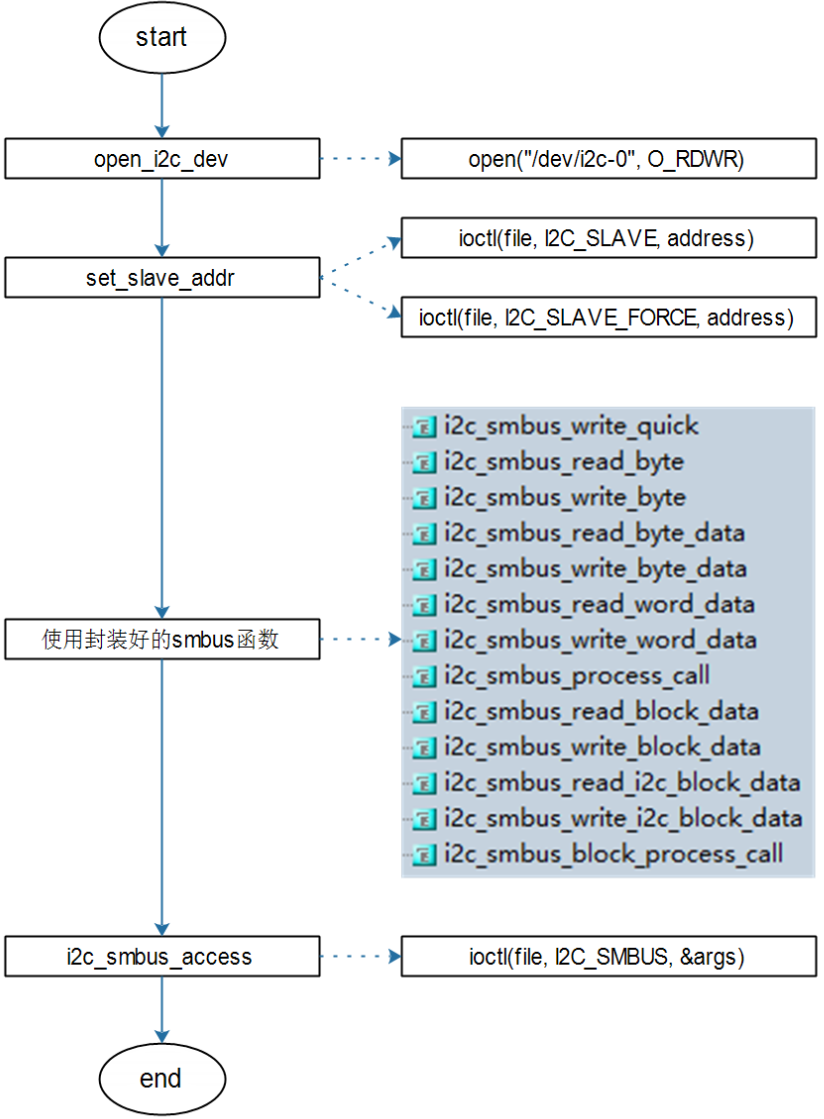
I2C-Tools可以通过SMBus来访问I2C设备,也可以使用一般的I2C协议来访问I2C设备。

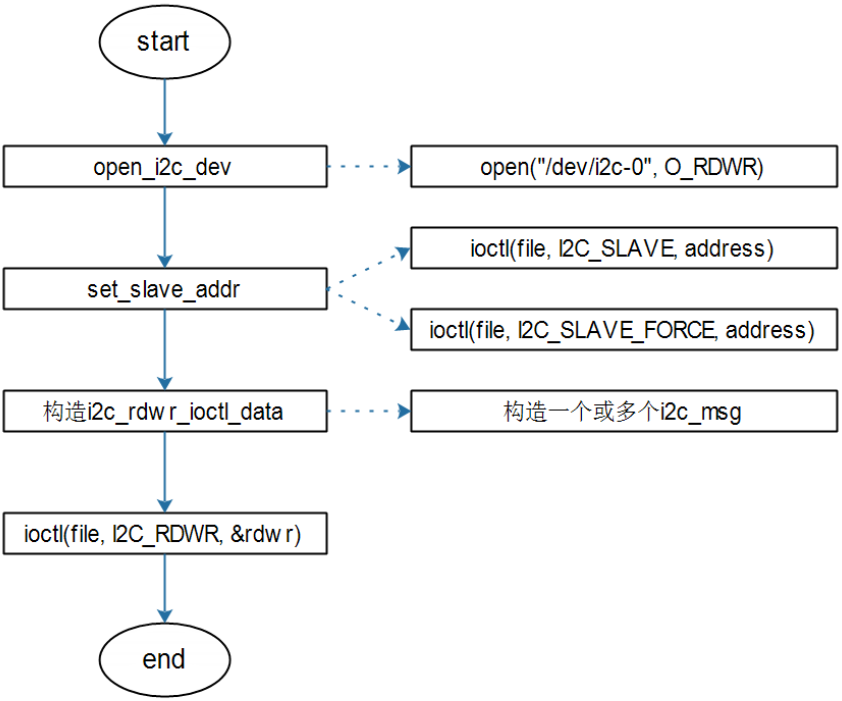
(1) 使用I2C方式

示例代码:i2ctransfer.c

image-20231023200031632

(2) 使用SMBus方式

示例代码:i2cget.c、i2cset.c

image-20231023200102753

4.2.3 使用I2C-Tools读取温湿度传感器AHT10的数据

image-20231023194745114

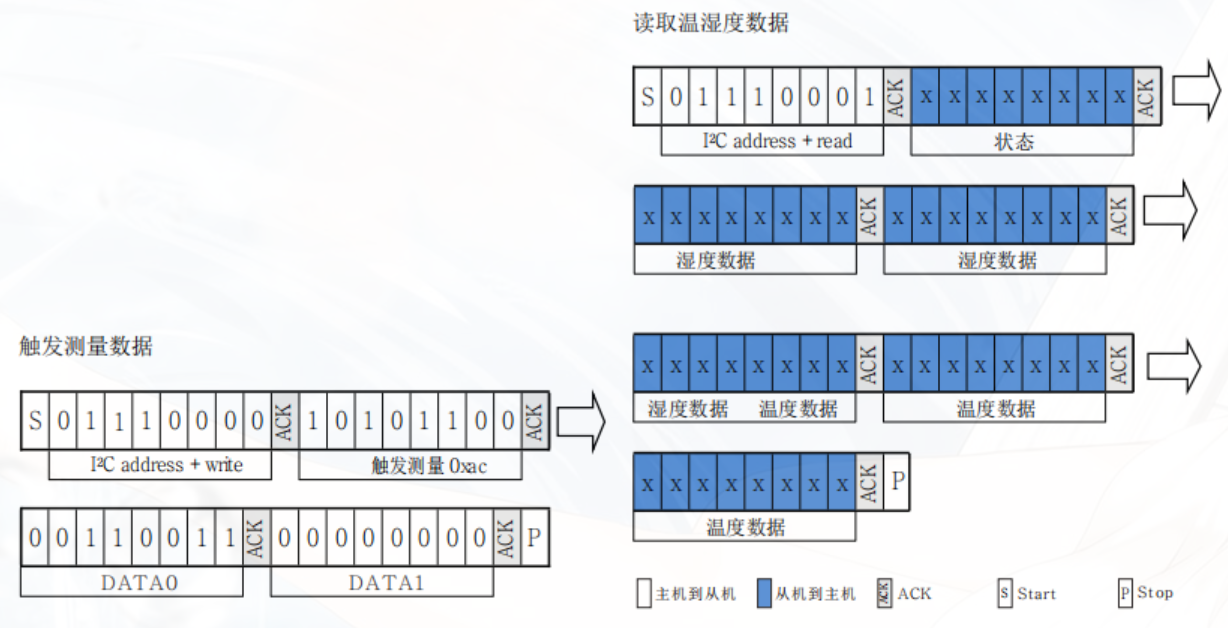
分析数据手册中提供的时序图,AHT10使用的通信协议中“读取温湿度数据”部分并不符合SMBus协议中规定的格式;因此,”触发测量数据“部分使用SMBus方式,“读取温湿度数据”部分使用I2C方式。

image-20231023200937458

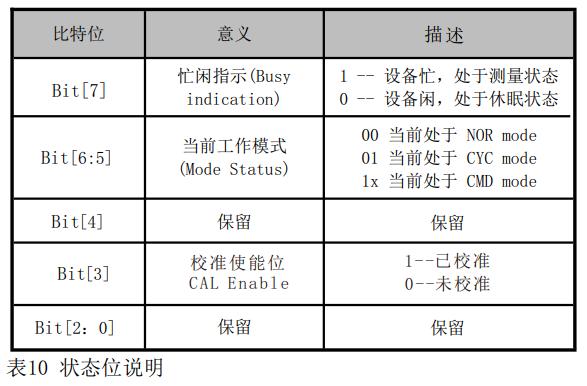
传感器在采集时需要时间,主机发出测量指令(0xAC) 后,延时75毫秒以上再读取转换后的数据并判断返回的状 态位是否正常。若状态比特位[Bit7]为0代表数据可正常读取,为1时传感器为忙状态,主机需要等待数据处理完成。

代码
1
2
3
4
5
6
7
8
9
10
11
12
13
14
15
16
17
18
19
20
21
22
23
24
25
26
27
28
29
30
31
32
33
34
35
36
37
38
39
40
41
42
43
44
45
46
47
48
49
50
51
52
53
54
55
56
57
58
59
60
61
62
63
64
65
66
67
68
69
70
71
72
73
74
75
76
77
78
79
80
81
82
83
84
85
86
87
88
89
#include "i2cbusses.h"
#include <errno.h>
#include <i2c/smbus.h>
#include <linux/i2c-dev.h>
#include <linux/i2c.h>
#include <stdio.h>
#include <stdlib.h>
#include <string.h>
#include <sys/ioctl.h>
#include <time.h>
#include <unistd.h>
#include <stdint.h>
const uint32_t N = 1 << 20;

int main(int argc, char **argv)
{
unsigned char read_buffer[6], dev_addr = 0x38;
struct i2c_rdwr_ioctl_data rdwr;
struct i2c_msg msg;
char filename[20];
int fd, ret;
float temper, humid;
unsigned int t, h;

if (argc != 2)
{
printf("Usage:\n");
printf("read AHT10: %s <i2c_bus_number> string\n", argv[0]);
return -1;
}
// 打开I2C Controller
fd = open_i2c_dev(argv[1][0] - '0', filename, sizeof(filename), 0);
if (fd < 0)
{
printf("can't open %s\n", filename);
return -1;
}
// 设置从机地址
if (set_slave_addr(fd, dev_addr, 0))
{
printf("can't set slave address\n");
return -1;
}
//写入传感器触发测量的命令
for (int i = 0; i < 3; i++)
{
//写入字:先写低8位,再写高8位
ret = i2c_smbus_write_word_data(fd, 0xAC, 0x33);
if (ret)
{
printf("i2c_smbus_write_word_data error\n");
return -1;
}
}
// 循环监测传感器设备是否忙
do
{
ret = i2c_smbus_read_byte(fd);
if (ret < 0)
{
printf("i2c_smbus_read_byte error\n");
return -1;
}
printf("ret = %d\n", ret);
} while (ret & 0x80);

//通过ioctl函数读取I2C设备文件
msg.addr = dev_addr;
msg.flags = I2C_M_RD;
msg.len = 6;
memset(read_buffer, 0, sizeof(read_buffer));
msg.buf = read_buffer;
rdwr.msgs = &msg;
rdwr.nmsgs = 1;
ret = ioctl(fd, I2C_RDWR, &rdwr);
if(ret == -1)
{
perror("ioctl_read_error");
return -1;
}
//将数据转换为实际温湿度
h = ((uint32_t)read_buffer[1] << 12) | ((uint32_t)read_buffer[2] << 4) | (read_buffer[3] >> 4);
t = ((uint32_t)(read_buffer[3] & 0x0f) << 16) | ((uint32_t)read_buffer[4] << 8) | read_buffer[5];
temper = -50.0 + 200.0 * (float)t / N;
humid = 100.0 * h / N;
printf("temper=%f, humid=%f \n", temper, humid);

return 0;
}