1. 匿名管道 1 2 #include <unistd.h> int pipe (int fd[2 ]) ;
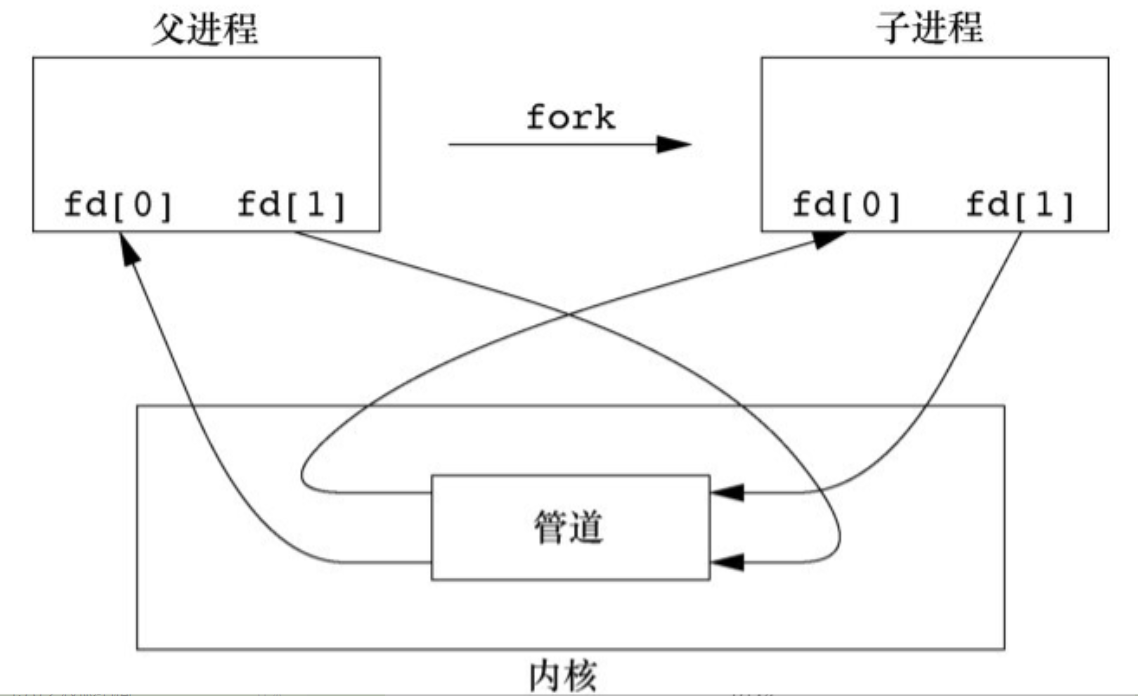
参数 fd 返回两个文件描述符:fd[0]为读而打开,fd[1]为写而打开。fd[1]的输出是fd[0]的输入。
返回值:若成功,返回0,若出错,返回-1
历史上是半双工的,现在某些系统提供全双工通道,不过为了移植性,最好还是假定管道是半双工 的。
管道只能在具有公共祖先的两个进程之间使用 ,进程调用fork之后,这个管道就能在父进程和子进程之间使用。
当管道的一端被关闭后,下列两条规则起作用:
当读(read)一个写端已被关闭的管道时,在所有数据都被读取后,read返回0,表示文件结束。
如果写(write)一个读端已被关闭的管道,则产生信号SIGPIPE。如果忽略该信号或者捕捉该信号并从其处理程序返回,则write返回−1,errno设置为EPIPE
在写管道(或 FIFO)时,常量 PIPE_BUF 规定了内核的管道缓冲区大小。如果对管道调用write,而且要求写的字节数小于等于 PIPE_BUF,则此操作不会与其他进程对同一管道(或FIFO)的 write 操作交叉进行 。但是,若有多个进程同时写一个管道(或 FIFO),而且我们要求写的字节数超过PIPE_BUF,那么我们所写的数据可能会与其他进程所写的数据相互交叉 。
用pathconf或fpathconf函数可以确定PIPE_BUF的值。
1.1 例子 简单的示例,父进程通过管道向子进程写数据,子进程从管道中读取并再标准输出上进行输出
1 2 3 4 5 6 7 8 9 10 11 12 13 14 15 16 17 18 19 20 21 22 23 24 25 26 27 28 #include "apue.h" int main (void ) { int n; int fd[2 ]; pid_t pid; char line[MAXLINE]; if (pipe(fd) < 0 ) err_sys("pipe error" ); if ((pid = fork()) < 0 ) { err_sys("fork error" ); } else if (pid > 0 ) { close(fd[0 ]); write(fd[1 ], "hello world\n" , 12 ); } else { close(fd[1 ]); n = read(fd[0 ], line, MAXLINE); write(STDOUT_FILENO, line, n); } exit (0 ); }
fork() 函数详解 (深入浅出 实例讲解)fork函数-CSDN博客](https://blog.csdn.net/Sunnyside /article/details/108196543)) 函数返回的 pid 是子进程的 PID;因此对于父进程返回子进程 PID;对于子进程返回 0;
1.2 例子2 父进程读取文件内容,写入管道中;子进程将管道的读端设置为 STDIN_FILENO ,从而调用execl函数执行 more 命令分页显示文件;
1 2 3 4 5 6 7 8 9 10 11 12 13 14 15 16 17 18 19 20 21 22 23 24 25 26 27 28 29 30 31 32 33 34 35 36 37 38 39 40 41 42 43 44 45 46 47 48 49 50 51 52 53 54 55 56 57 58 59 60 61 62 63 64 65 66 67 68 69 70 71 72 #include "apue.h" #include <sys/wait.h> #define DEF_PAGER "/bin/more" int main (int argc, char *argv[]) { int n; int fd[2 ]; pid_t pid; char *pager, *argv0; char line[MAXLINE]; FILE *fp; if (argc != 2 ) err_quit("usage: a.out <pathname>" ); if ((fp = fopen(argv[1 ], "r" )) == NULL ) err_sys("can't open %s" , argv[1 ]); if (pipe(fd) < 0 ) err_sys("pipe error" ); if ((pid = fork()) < 0 ) { err_sys("fork error" ); } else if (pid > 0 ) { close(fd[0 ]); while (fgets(line, MAXLINE, fp) != NULL ) { n = strlen (line); if (write(fd[1 ], line, n) != n) err_sys("write error to pipe" ); } if (ferror(fp)) err_sys("fgets error" ); close(fd[1 ]); printf ("enter parent\n" ); if (waitpid(pid, NULL , 0 ) < 0 ) err_sys("waitpid error" ); printf ("exit parent\n" ); exit (0 ); } else { close(fd[1 ]); if (fd[0 ] != STDIN_FILENO) { if (dup2(fd[0 ], STDIN_FILENO) != STDIN_FILENO) err_sys("dup2 error to stdin" ); close(fd[0 ]); } if ((pager = getenv("PAGER" )) == NULL ) pager = DEF_PAGER; if ((argv0 = strrchr (pager, '/' )) != NULL ) argv0++; else argv0 = pager; if (execl(pager, argv0, (char *)0 ) < 0 ) err_sys("execl error for %s" , pager); } exit (0 ); }
2.函数 popen 和 pclose 标准IO库提供函数 popen(),实现:创建一个管道, fork一个子进程,关闭未使用的管道端,执行一个 shell 运行命令,然后等待命令终止。
1 2 3 #include <stdio.h> FILE *popen (const char *cmdstring, const char *type) ; int pclose (FILE *fp) ;
popen:若成功,返回文件指针;若出错,返回NULL
pclose:若成功,返回cmdstring 的终止状态;若出错,返回-1
当 type 设置为 r 时:
当 type 设置为 w 时:
2.1 例子 使用 popen 重新上面的例子:
1 2 3 4 5 6 7 8 9 10 11 12 13 14 15 16 17 18 19 20 21 22 23 24 25 26 27 28 29 30 31 #include "apue.h" #include <sys/wait.h> #define PAGER "${PAGER:-more}" int main (int argc, char *argv[]) { char line[MAXLINE]; FILE *fpin, *fpout; if (argc != 2 ) err_quit("usage: a.out <pathname>" ); if ((fpin = fopen(argv[1 ], "r" )) == NULL ) err_sys("can't open %s" , argv[1 ]); if ((fpout = popen(PAGER, "w" )) == NULL ) err_sys("popen error" ); while (fgets(line, MAXLINE, fpin) != NULL ) { if (fputs (line, fpout) == EOF) err_sys("fputs error to pipe" ); } if (ferror(fpin)) err_sys("fgets error" ); if (pclose(fpout) == -1 ) err_sys("pclose error" ); exit (0 ); }
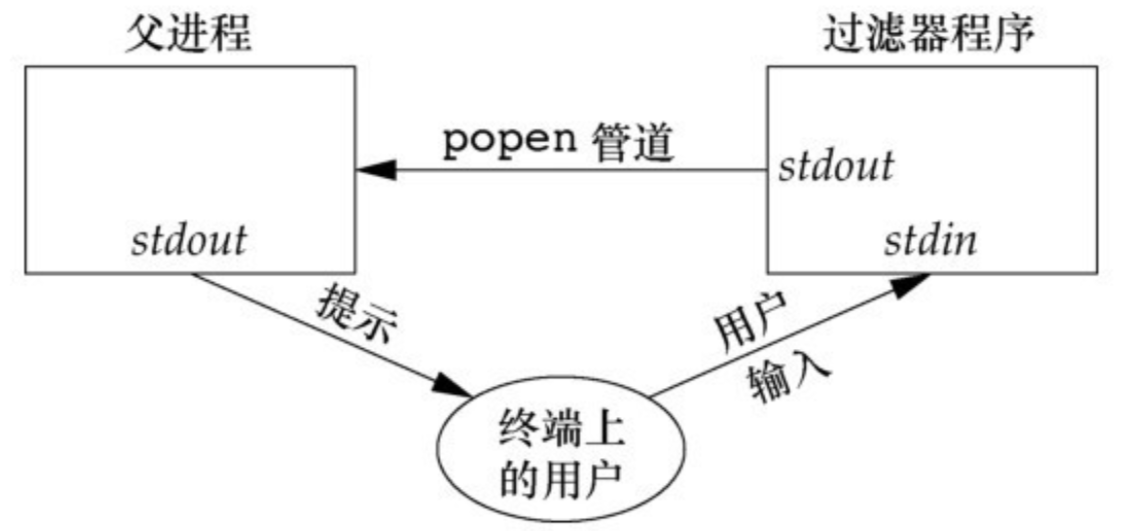
2.2 例子2-过滤器程序 考虑一个应用程序,它向标准输出写一个提示,然后从标准输入读1行。然后该程序对输入进行的变换可能是路径名扩充,或者是提供一种历史机制(记住以前输入的命令),总之提供了一种“过滤”的操作。
myuclc.c
1 2 3 4 5 6 7 8 9 10 11 12 13 14 15 16 17 18 #include "apue.h" #include <ctype.h> #include <stdio.h> int main (void ) { int c; while ((c = getchar()) != EOF) { if (isupper (c)) c = tolower (c); if (putchar (c) == EOF) err_sys("output error" ); if (c == '\n' ) fflush(stdout ); } exit (0 ); }
popen.c
1 2 3 4 5 6 7 8 9 10 11 12 13 14 15 16 17 18 19 20 21 22 23 24 25 #include "apue.h" #include <sys/wait.h> int main (void ) { char line[MAXLINE]; FILE *fpin; if ((fpin = popen("myuclc" , "r" )) == NULL ) err_sys("popen error" ); for (;;) { fputs ("prompt> " , stdout ); fflush(stdout ); if (fgets(line, MAXLINE, fpin) == NULL ) break ; if (fputs (line, stdout ) == EOF) err_sys("fputs error to pipe" ); } if (pclose(fpin) == -1 ) err_sys("pclose error" ); putchar ('\n' ); exit (0 ); }
myuclc.c 中提供了一个小写转换的程序,popen.c 调用 myuclc 命令将标准输入的字符的转换结果在标准输出上显示。
3.FIFO-命名管道 命名管道是一个单独类型的IO文件,可以通过 struct stat 结构的 st_mode 成员判断;使用 S_ISFIFO 宏进行测试。
创建 FIFO 文件:
1 2 3 #include <sys/stat.h> int mkfifo (const char *path, mode_t mode) ;int mkfifoat (int fd, const char *path, mode_t mode) ;
path 为该文件的路径,mode 和 open 函数的 mode 参数一致;
返回值:若成功,返回0;若出错,返回−1
mkfifoat函数和mkfifo函数相似,但是mkfifoat函数可以被用来在fd文件描述符表示的目录相关的位置创建一个FIFO
创建之后,可以通过标准IO函数来操作 FIFO 文件。
当以阻塞/非阻塞方式open一个FIFO时:
阻塞方式,只读open要阻塞到某个其他进程为写而打开这个FIFO为止。类似地,只写open要阻塞到某个其他进程为读而打开它为止。
如果指定了 O_NONBLOCK,则只读 open 立即返回。但是,如果没有进程为读而打开一个FIFO,那么只写open将返回−1,并将errno设置成ENXIO
类似于管道,若 write 一个尚无进程为读而打开的 FIFO,则产生信号 SIGPIPE 。若某个FIFO的最后一个写进程关闭了该FIFO,则将为该FIFO的读进程产生一个文件结束标志 。
一个给定的 FIFO 有多个写进程是常见的。这就意味着,如果不希望多个进程所写的数据交叉,则必须考虑原子写 操作。和管道一样,常量PIPE_BUF说明了可被原子地写到FIFO的最大数据量 。
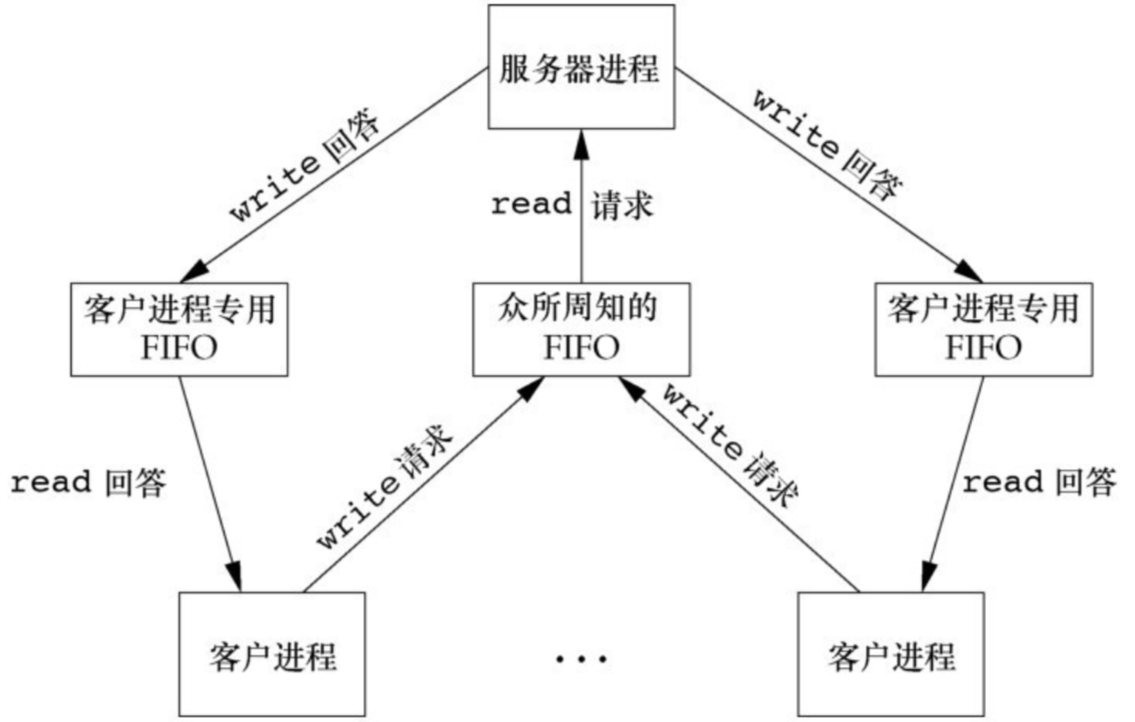
3.1 示例 使用 多个 FIFO 文件可以创建一个多客户进程-单服务器进程的通信功能,如下图所示:
简单的示例程序如下:
server.c
1 2 3 4 5 6 7 8 9 10 11 12 13 14 15 16 17 18 19 20 21 22 23 24 25 26 27 28 29 30 31 32 33 34 35 36 37 38 39 #include "apue.h" #include <stdio.h> #include <sys/stat.h> #include <sys/types.h> #include <sys/stat.h> #include <fcntl.h> #include <unistd.h> #include <stdbool.h> #include <sys/types.h> #include <sys/stat.h> #define SERVER_NAME "./server.fifo" #define CLIENT_NAME "./client.fifo" char buf[1024 ];int main (int argc, char **argv) { int fd_read; int fd_write = -1 ; char send_str[20 ] = "hello client\n" ; mkfifo(SERVER_NAME, 0664 ); mkfifo(CLIENT_NAME, 0664 ); fd_read = open(SERVER_NAME, O_RDONLY); printf ("open success\n" ); while (1 ) { read(fd_read, buf, 1024 ); printf ("server recv:%s\n" , buf); if (strcmp (buf, CLIENT_NAME) == 0 ) { if (fd_write == -1 ) fd_write = open(CLIENT_NAME, O_WRONLY); write(fd_write, send_str, strlen (send_str) + 1 ); } sleep(5 ); } }
client.c
1
2
3
4
5
6
7
8
9
10
11
12
13
14
15
16
17
18
19
20
21
22
23
24
25
26
27
28
29
30
31
32
33
34
#include "apue.h" #include <stdio.h> #include <sys/stat.h> #include <sys/types.h> #include <sys/stat.h> #include <fcntl.h> #include <unistd.h> #include <stdbool.h> #include<sys/types.h> #include<sys/stat.h> #define SERVER_NAME "./server.fifo" #define CLIENT_NAME "./client.fifo" char buf[1024]; int main(int argc, char **argv) { int fd_write; int fd_read = -1; char send_str[20] = "hello client\n"; fd_write = open(SERVER_NAME, O_WRONLY); printf("open success\n"); while(1) { write(fd_write, CLIENT_NAME, strlen(CLIENT_NAME) + 1); sleep(5); if(fd_read == -1) fd_read = open(CLIENT_NAME, O_RDONLY); read(fd_read, buf, 1024); printf("client recv: %s", buf); } }
运行之后可以看到服务器和客户端分别收到信息:
此外:
服务器进程不能判断一个客户进程是否崩溃终止,这就使得客户进程专用FIFO会遗留在文件系统中。
服务器进程还必须得捕捉SIGPIPE信号,因为客户进程在发送一个请求后有可能没有读取响应就终止了,于是留下一个只有写进程(服务器进程)而无读进程的客户进程专用FIFO。